Queues & ACD
A queue is a waiting room for calls. Callers wait there until an agent is free; the ACD (Automatic Call Distributor) decides which waiting caller goes to which agent. This chapter covers creating queues and how distribution works.
Orbit has standard queues — a waiting area that callers enter and agents are matched from. There's no separate "agent queue" object (a per-agent personal queue); to send a call straight to one person you use the Transfer to Agent block in a flow, not a dedicated queue. So everywhere this guide says "queue," it means a standard queue.
1. Creating a queue
Menu path: Routing → Queues.
Creating a queue needs queues.create in your security profile. A new queue is
active as soon as you save it — agents start receiving its calls once the
queue is added to their routing profile.
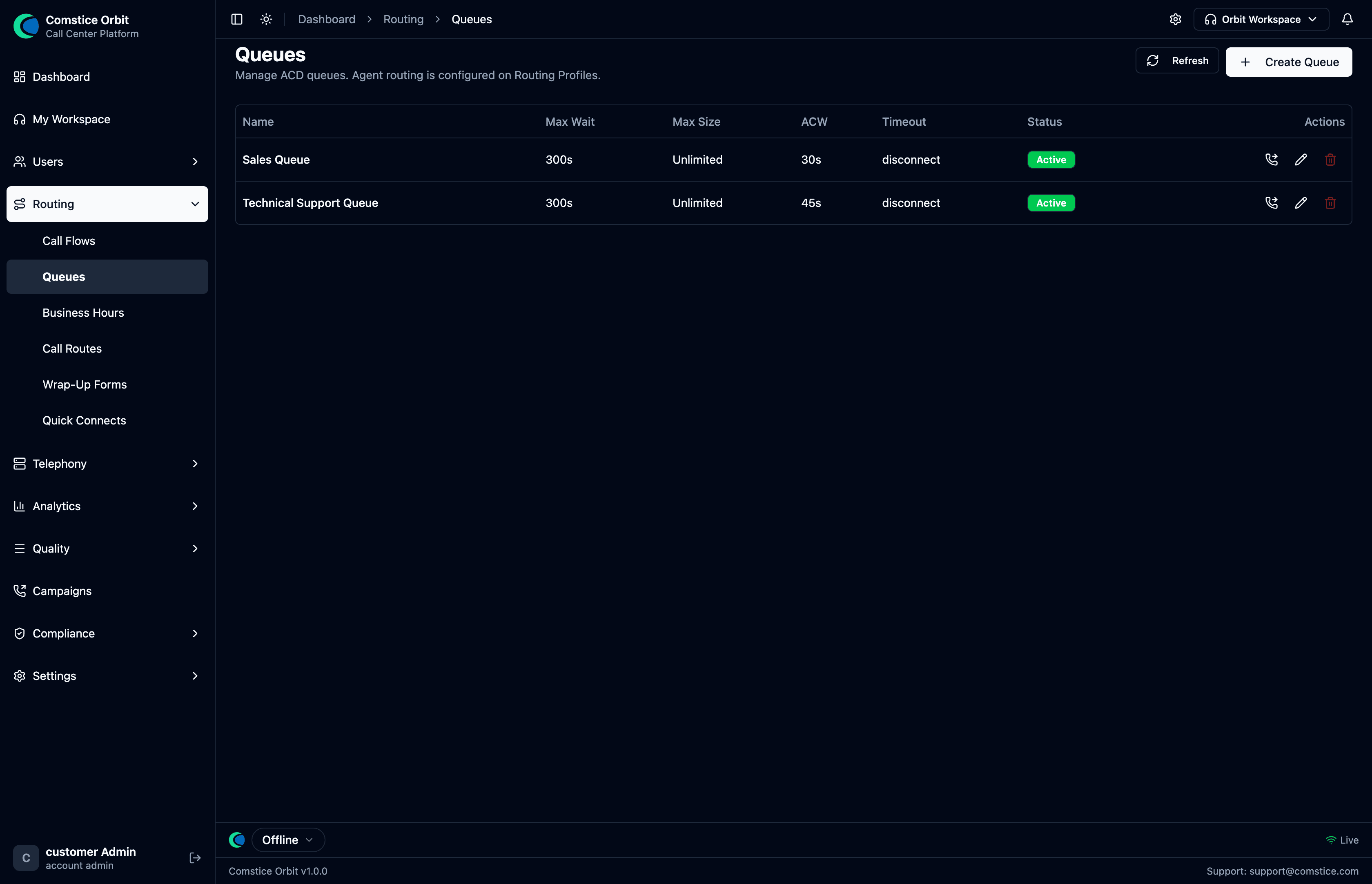 Each queue shows its max wait, max size, after-call-work (ACW) time, timeout action, and status.
To create a queue: Queues → Create Queue. This opens a full-page form (the create/edit forms are pages now, not pop-up dialogs) with everything below:
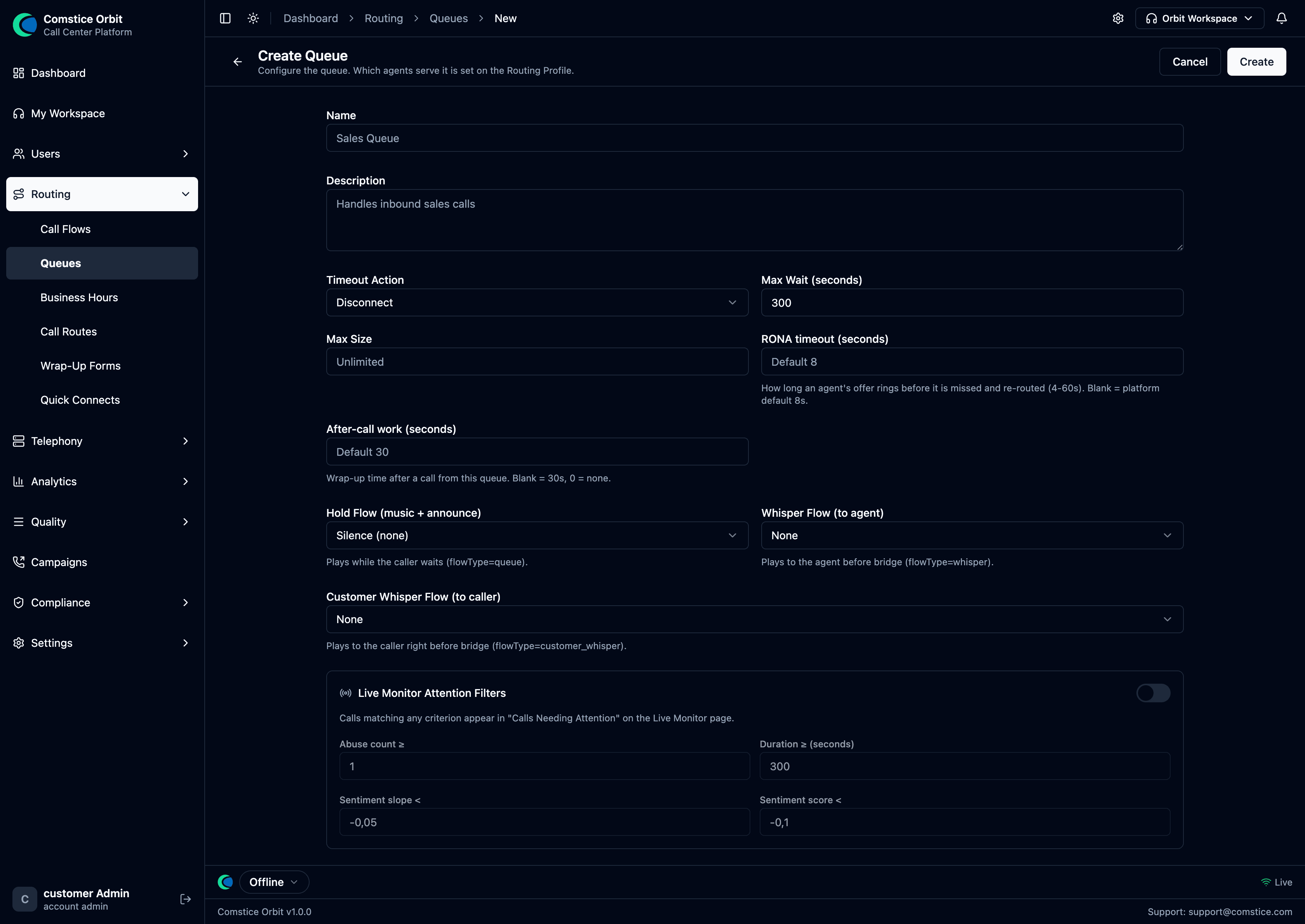 The queue form: name/description, timing & limits, the experience flows the caller and agent hear, and the Live Monitor attention filters.
The full recipe:
- Routing → Queues → Create Queue.
- Name the queue and set its timing & limits (below).
- Pick the experience flows (hold, whisper) callers and agents hear.
- Set the Timeout Action for callers who wait past max-wait.
- Create — the queue is active immediately.
- Add the queue to a Routing Profile so agents serve it.
Basics, timing & limits
| Setting | What it does |
|---|---|
| Name | The queue's name (e.g. "Sales Queue"). |
| Description | A free-text note on what the queue is for. |
| Timeout Action | What happens when a caller waits past Max Wait: Disconnect, transfer, or voicemail. |
| Max Wait (seconds) | How long a caller can wait before the timeout action fires (default 300). |
| Max Size | Maximum callers allowed in the queue (blank = unlimited). |
| RONA timeout (seconds) | How long an agent's offer rings before it's missed and re-routed to the next agent (4–60s; blank = platform default 8s). (RONA = Redirect On No Answer.) |
| After-call work (seconds) | Wrap-up time after a call from this queue before the agent goes available (blank = 30s; 0 = none). |
Experience flows
| Setting | What it does |
|---|---|
| Hold Flow (music + announce) | What the caller hears while waiting (music + position announcements). |
| Whisper Flow (to agent) | What the agent hears just before connect ("Sales call"). |
| Customer Whisper Flow (to caller) | What the caller hears just before connect. |
A queue does not carry a "required skills" list — Orbit matches callers to agents by routing profile + priority/delay + longest-idle, not by per-agent skill tags. If you need Sales calls to reach only Sales agents, model that with a dedicated queue + routing profile, not a skill filter.
Live Monitor Attention Filters
Turn on this section (the toggle in the form) to decide when a call on this queue
appears under "Calls Needing Attention" on the supervisor
Live Monitor. A call matching any criterion is
flagged. This is unique to Orbit (a value-add over a classic ACD) and needs the
real-time sentiment license plus the live_monitor.filters_edit permission:
| Setting | What it does |
|---|---|
Abuse count ≥ | Flag the call after this many abusive segments. |
Duration ≥ (seconds) | Flag calls longer than this. |
Sentiment slope < | Flag when sentiment is trending down past this rate. |
Sentiment score < | Flag when the absolute sentiment score drops below this. |
You don't add agents to a queue here. You add this queue to a Routing Profile, and assign that profile to agents.
Other queue-scoped features
Two more things attach to a queue beyond the create form:
- Service-level target — a per-queue SLA goal (e.g. 80 % answered within 20 s) that feeds the Queue Status SLA indicator and breach alerts (Reference §2). Configurable via the queue API today; a form field is on the roadmap.
- Queued callbacks — a caller can be offered a call-back instead of waiting; when an agent frees up the callback is dialed and connected. See Developer §8 for the current wiring status.
2. How the ACD distributes calls
Orbit uses longest-idle distribution with per-profile delays. In plain terms:
When a call arrives
- The call joins the queue, ordered by arrival time (oldest first).
- Orbit finds agents whose routing profile includes this queue and for whom the caller has waited past that profile's delay for this queue (delay is set on the profile↔queue link, not on the queue itself).
- If an agent is available, the call is reserved for them and their phone rings.
- If nobody is free, the caller waits (hearing the hold flow) and Orbit retries every few seconds.
When an agent becomes available
- Orbit looks at the agent's routing profile and checks their queues in priority order.
- In each queue it picks the oldest eligible waiting caller.
- That call is reserved and offered to the agent.
Choosing between several free agents
When more than one agent could take a call, Orbit offers it to the agent who has been idle the longest. This spreads work fairly and avoids hammering the same person.
The priority order and delay the ACD uses above are configured on the Routing Profile, not on the queue. The queue is the waiting room; the profile decides which agents serve it, in what order, and after what delay. If two callers tie on priority and delay, the longest-waiting one wins (first-in, first-out).
Reserve → Commit → Release
| Stage | Meaning |
|---|---|
| Reserve | The call is held for a ringing agent (still in the queue). |
| Commit | The agent accepts; the call leaves the queue and connects. |
| Release | The agent declines/misses/times out; the call returns to the queue for the next agent. |
| Abandon | The caller hangs up while waiting; the call is removed. |
On a Release (no-answer), the caller is safe — they go back to the queue. But the agent is moved into a Missed state and stops receiving new offers until they're cleared/return themselves to Available. This is deliberate (don't keep ringing a phone nobody's answering), and it's the #1 "why did calls stop coming to me?" question — see Agent States.
3. Business Hours
Business Hours define when your queues/lines are open, including holidays and weekend overrides.
In some platforms, hours of operation are a field on the queue. Orbit keeps them separate and reusable: you define a schedule here once, then reference it from a Check Hours block in any flow. One schedule can gate many flows, and the flow — not the queue — decides what an out-of-hours call hears (a "we're closed" message, voicemail, or a callback offer).
To set up: Business Hours → New:
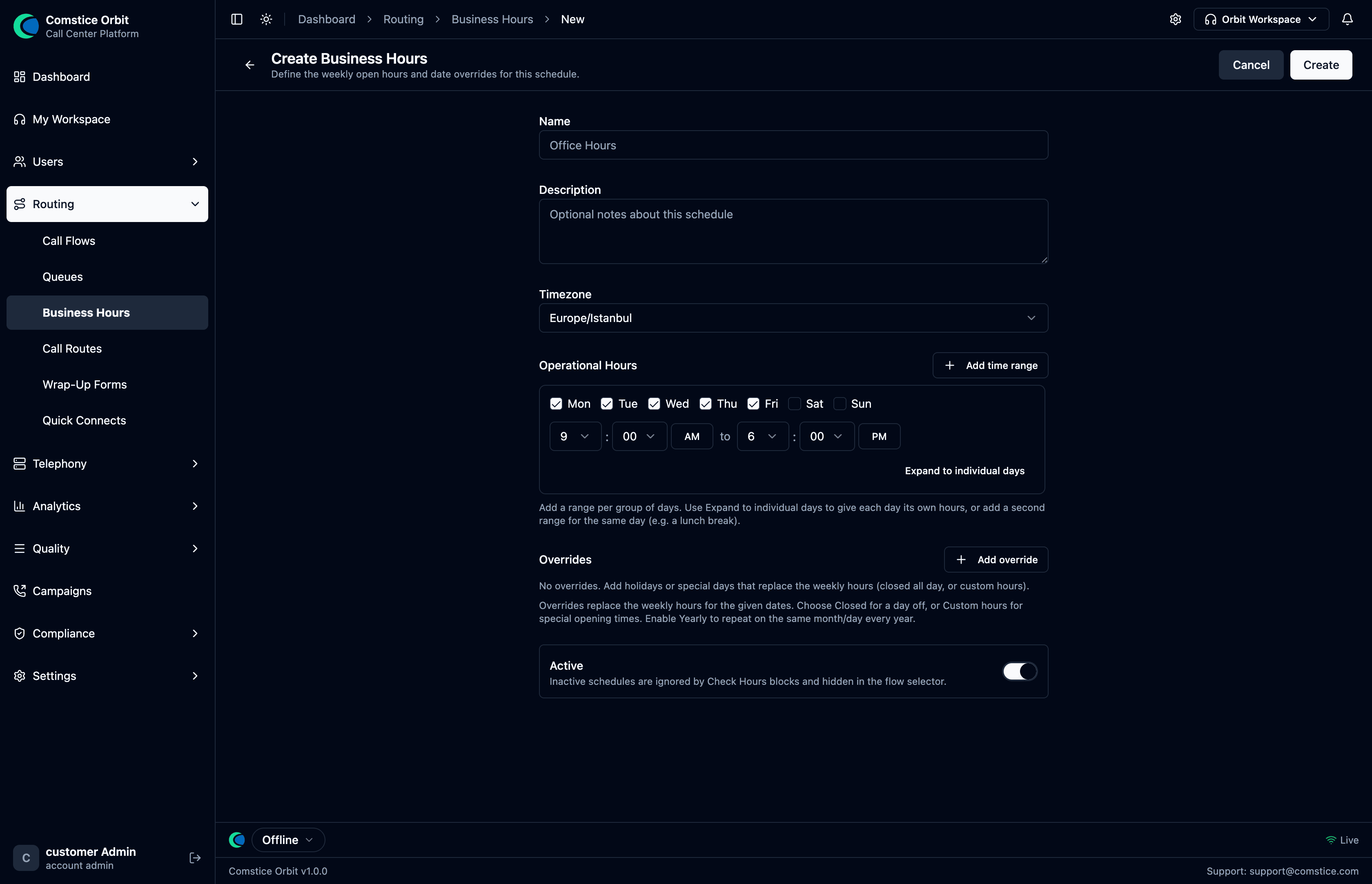 Name the schedule, set a time zone, and define each weekday's open/close times (or mark it closed). Add holiday/date exceptions that override the weekly pattern.
| Field | What it does |
|---|---|
| Name | The schedule's name (e.g. "UK Office Hours"). |
| Time zone | The zone the open/close times are interpreted in. |
| Weekly hours | Per weekday: open and close times, or mark the day closed. |
| Holidays / exceptions (optional) | Specific dates that override the weekly pattern (e.g. public holidays = closed). |
Define the weekly times and any holiday exceptions, Save, then reference the schedule from a Check Hours block in your call flow.