Getting Started with Orbit
Welcome to Comstice Orbit — a cloud contact center platform. This chapter gives you the big picture: what Orbit is, who uses it, how to sign in to your company's workspace, and a tour of the screen. If you have never seen Orbit before, start here.
1. What is Orbit?
Orbit is a complete call center in your browser. It connects your phone carrier (the SIP trunk that delivers calls) to your agents (who answer calls in a web softphone — no desk phone required), and adds everything a modern contact center needs on top:
- Call routing & IVR — decide where each call goes ("Press 1 for Sales").
- Queues & ACD — hold callers and distribute them fairly to agents.
- Live supervision — listen in, coach, or join an agent's call in real time.
- Recording, transcription & sentiment — every call can be recorded, transcribed, and scored for customer sentiment.
- Quality & compliance — evaluate calls, set recording retention, place legal holds, and track who accessed what.
You don't install anything. You open a web address, sign in, and work.
Throughout this guide, every screen is explained as What it is → Who uses it → How to do it. Technical terms are defined the first time they appear.
2. What Orbit supports out of the box
Two things make Orbit work: the open standards it speaks to the outside world (so it drops into your existing carrier and network), and the intelligent contact-center engine Comstice built on top (which decides what actually happens to every call). The tables below cover the standards; the section after them covers the engine. Everything here is enabled by default.
Open standards — will it work with what I already have?
Orbit is built on open telephony standards, not a proprietary protocol. If your carrier, PBX or handset speaks standard SIP, it speaks to Orbit — there is no vendor lock-in on the wire. Everything below is enabled by default; you don't install plugins to get it.
✅ = supported and enabled out of the box. 🔧 = supported, configured per account/trunk. Everything here is standards-based, so any compliant device or carrier on the other end interoperates.
Signalling — SIP
| Standard | What it means for you | |
|---|---|---|
| SIP (RFC 3261) | The call-control protocol. Orbit is a back-to-back user agent (B2BUA) — it sits in the middle of every call. | ✅ |
| SIP over UDP / TCP / TLS | Connect a trunk over plain UDP/TCP, or SIP-TLS (SIPS) for encrypted signalling. | ✅ |
| SIP trunk interop | Validated against Cisco Unified CM (CUCM) and Avaya. Any RFC-3261 SBC/gateway works. | ✅ |
DTMF (RFC 2833 / RFC 4733 telephone-event) | Keypad digits ("press 1") carried in the RTP stream — used by IVR menus and secure payment capture. | ✅ |
| REGISTER / OPTIONS | Endpoints register to Orbit; OPTIONS keep-alives detect a dead gateway. | ✅ |
Media — RTP, codecs, transcoding
| Standard | What it means for you | |
|---|---|---|
| RTP / RTCP (RFC 3550) | The audio itself and its quality reports. | ✅ |
| Opus | Wideband HD codec — the default for the WebRTC softphone. | ✅ |
| G.711 (µ-law PCMU / A-law PCMA) | The universal PSTN codec every carrier speaks. | ✅ |
| G.722 | Wideband HD voice for SIP endpoints that support it. | ✅ |
| G.729 | Low-bandwidth codec common on Cisco/Avaya trunks. | ✅ |
| Transcoding | Orbit converts between codecs mid-call (e.g. Opus ↔ G.711 ↔ G.729), so an HD browser agent and a G.729 trunk talk with no manual setup. | ✅ |
WebRTC & NAT traversal (the browser softphone)
| Standard | What it means for you | |
|---|---|---|
| WebRTC | Agents take calls in Chrome — microphone and audio in the browser, nothing to install. | ✅ |
| DTLS-SRTP | WebRTC media is always encrypted; keys are negotiated per call. | ✅ |
| SRTP | Secure RTP for encrypted media on SIP legs too. | ✅ |
| ICE / STUN / TURN | Automatic NAT traversal so agents connect from home, office or mobile. Orbit ships a TURN/TURNS server (coturn) for restrictive networks. | ✅ |
Recording, encryption & data protection
| Standard / capability | What it means for you | |
|---|---|---|
| Stereo call recording | Caller and agent on separate channels — clearer transcripts and QA. | ✅ |
| Live audio fork | A real-time copy of the audio feeds transcription and sentiment without touching the call. | ✅ |
| AES-256-GCM at-rest encryption | Recordings are envelope-encrypted on disk. Without the key, the files are unreadable. | ✅ |
| Configurable retention | Per-account retention policy with automatic deletion when the window expires. | 🔧 |
| Legal hold | Freeze specific recordings so retention cannot delete them while a case is open. | 🔧 |
Compliance standards
| Standard | What Orbit gives you | |
|---|---|---|
| PCI DSS (card payments) | Pause/Resume Recording and agent-assisted payment capture keep card numbers and CVV out of recordings and transcripts. DTMF entry is masked. Gated per flow/queue, not on by default for every call. | ✅ |
| GDPR / consent | Recording-consent capture (with an audit trail of what the caller heard and pressed) and DSAR right-to-erasure across recordings, transcripts and search. | ✅ |
| PII redaction | Card numbers, CVV, SSN and email are always masked; phone, name and address are configurable — in live views, stored transcripts and search. | ✅ |
| Access audit | Who listened to or exported which recording, and when. | ✅ |
Access, security & integration
| Standard / capability | What it means for you | |
|---|---|---|
| Multi-tenant isolation | Every company sees only its own data; enforced at the database layer. | ✅ |
| Role-based access (RBAC) | Fine-grained Security Profiles decide who sees and does what. | ✅ |
| JWT authentication | Token-based login for the panel, softphone and APIs. | ✅ |
| REST API | Programmatic access to configuration and reporting. | ✅ |
| Contact attributes / trace record | Attach key-values to a call in the flow; they reach the agent and are written to the call record at hang-up (a contact-trace record, à la Amazon Connect). | ✅ |
The intelligent engine — Orbit's own contact-center brain
The standards above are how Orbit talks to the outside world. Everything that decides what happens to a call inside — which agent gets it, in what order, what the caller hears, and what the agent does afterward — is Comstice's own engine, not an off-the-shelf PBX. On the agent side there is no "standard" doing this: agent state and queueing are controlled automatically by a system built for Orbit, and it behaves identically whether you run 5 agents or 5,000.
Automatic agent-state & queue control
Orbit continuously tracks every agent's real-time state (Available, On Call, Wrap-Up, Not Ready…) and the live contents of every queue. You never wire this up by hand. The moment an agent becomes Available, gets busy, finishes wrap-up or drops offline, Orbit re-evaluates routing and matches the next waiting caller automatically. Callers are matched through Routing Profiles: each agent's profile lists the queues they serve, each with a priority and an optional delay — so a backup team only starts ringing after the primary team has had first refusal. Among the eligible agents for a queue, Orbit offers the call to the longest-idle one first — the fairest distribution and the industry default.
RONA — Redirect On No Answer (a call never gets stuck on one agent)
- When a caller is offered to an agent, Orbit reserves that agent and rings them.
- If the agent doesn't answer within the ring window, the offer is withdrawn and the call automatically moves to the next best agent — the caller stays in queue, they are not dropped.
- Between offers there is a short signalling / reservation wait while Orbit tears down the missed leg and sets up the next one.
- If the signalling itself stalls or drops mid-offer (an agent's network hiccups, the call never truly connects), Orbit detects the stuck offer and re-routes to another agent instead of leaving the caller hanging. No caller is ever trapped on an agent who can't pick up.
Dynamic IVR
The IVR — the "press 1 for Sales" menus, spoken prompts, business-hours checks, data lookups and branching — is built in a visual flow editor and driven from the database, not hard-coded. Change a menu, prompt, announcement or route and publish: it takes effect on the very next call, with no restart and no downtime. Flows can read data, set contact attributes, branch on what the caller presses or says, and hand off to queues.
Dynamic wrap-up (After-Call Work)
When a call ends, Orbit can place the agent into a wrap-up state and present a form tailored to the queue or flow the call came through — disposition codes, notes, follow-up fields. Wrap-up time is tracked and can be time-boxed, and the disposition is written to the call record for reporting.
AI voice self-service — a Conversational AI agent that answers callers
Orbit ships with an on-platform Conversational AI voice agent (the AI Assistant flow block) that can handle a caller end-to-end with no human involved — and, crucially, it can look up live data from your own systems to give real answers, not scripted ones. A typical self-service call:
- Greeting — the caller hears a natural-sounding welcome (neural speech synthesis), authored by you.
- Identify the caller — they enter their account number and PIN. In connector mode this is validated against your own backend API — Orbit never holds your customer database; it just asks your system "is this account + PIN valid?"
- Ask in plain language — the caller speaks their question ("how many days left on my plan?"). Orbit transcribes it (ASR — automatic speech recognition).
- Answer with real data — the AI agent combines two things: RAG (retrieval) over your knowledge-base articles, and secure lookup tools that call your CRM API live — customer profile, subscription end date, open tickets. So it can say "your plan is active until March 3rd" or "you have 2 open tickets", pulled from your backend in real time.
- Speak the answer — the reply is read back by voice (speech synthesis).
- Escalate cleanly — if the caller asks for a person, uses an escalation keyword, or the AI isn't confident enough, the call is handed to a live agent — with the caller already identified.
Why this is safe to put in front of real customers:
- Runs on your own infrastructure. The language model is local and offline-capable — customer data never leaves the platform to a public AI cloud.
- Identity-gated and injection-proof. The AI's data-lookup tools only ever run for a verified caller, and the customer ID they use comes from the verified-identity step — never from anything the caller or the model "said." A caller cannot talk the bot into reading someone else's account.
- Grounded, not hallucinated. Answers come from your own articles and your own API; the model is instructed to answer only from that context, and low-confidence answers escalate instead of guessing.
While an agent is on a call, Orbit's agent-assist listens to the conversation and quietly surfaces relevant knowledge-base snippets on the agent's screen in real time — so newer agents answer like veterans.
AI throughout the call
| Capability | What it means for you | |
|---|---|---|
| Live transcription (ASR) | Real-time speech-to-text of every call as it happens. | ✅ |
| Post-call transcription | High-accuracy transcript produced after the call. | ✅ |
| Sentiment, emotion & escalation cues | Per-utterance customer sentiment, emotion and abuse/toxicity scoring — live and post-call. | ✅ |
| AI call summaries | Every call is distilled into a short, plain-language recap — reason, outcome, next steps — so a supervisor grasps a conversation in seconds without opening the transcript. | ✅ premium |
| Real-time agent-assist | While an agent is on a call, each caller utterance is matched against your knowledge base and the most relevant articles surface on the agent's screen — instantly, with no lookup and no LLM latency. New agents answer like veterans. | ✅ premium |
| Transcript & Summary Search | Combined semantic + keyword search across every transcript and every AI summary — find the exact moment, or the whole call, by meaning or by word. | ✅ premium |
| AI quality scoring | An LLM pre-scores QA evaluations against the transcript; a human always reviews before it counts. | ✅ premium |
| PII redaction | Card, CVV, SSN and email always masked; phone/name/address configurable — in live views, recordings and search. | ✅ |
| Answering-machine detection | On outbound campaigns, tell a human from a voicemail and branch the flow. | ✅ |
Orbit's speech AI — ASR, speech-synthesis prompts, sentiment and the voice agent — is English-first by design. The interface ships in English, Spanish and this guide's other locales, but IVR prompts and analytics target English audio.
From every call to living knowledge — Summaries, Knowledge Base & Agent Assist
Most platforms stop at the recording. Orbit turns the content of your calls into an asset that keeps paying you back — a searchable memory of every conversation, a knowledge base that builds itself, and live help on your agents' screens. This is the loop the big names charge a premium for (Amazon Connect Contact Lens, Five9, Genesys Cloud, NICE CXone) — in Orbit it's one integrated flow, running on your own infrastructure, with your customer data never leaving the platform.
See the whole call without reading a word of it — AI Call Summaries
Nobody has time to read 2,000 transcripts. Orbit writes a short, plain-language summary for every call — why the customer called, what was decided, and what happens next. A supervisor scans a day's worth of conversations in minutes; a manager gets the gist of an escalation in one glance. Open the summary and one click takes you straight into the full Call Review — transcript, recording and sentiment — when you need the detail. Summaries live on their own Call Summaries page: a fast, filterable list (by queue, agent, date) with the recap on the right — no digging.
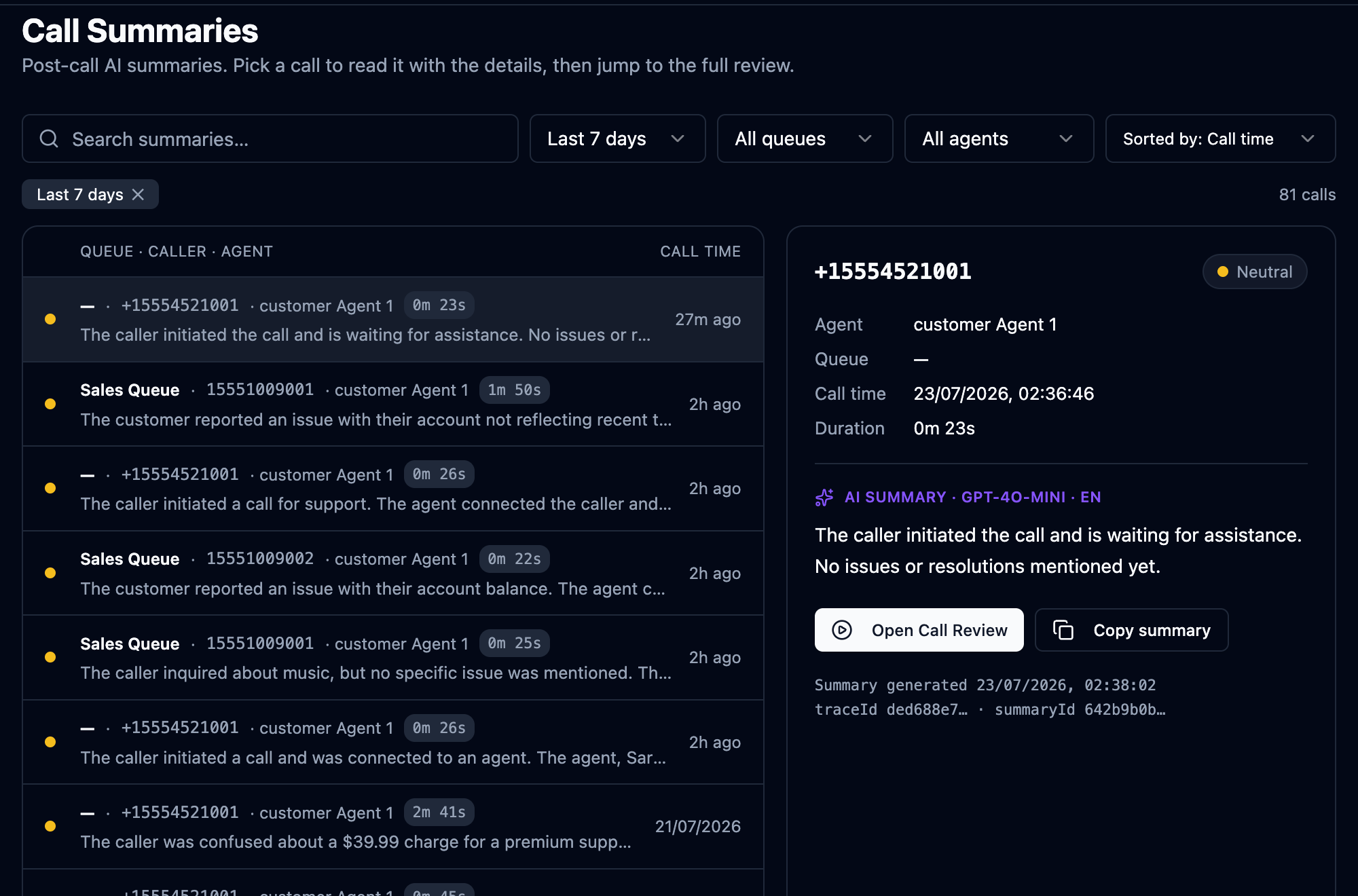 Call Summaries: pick a call on the left, read its AI-written recap on the right — reason, resolution and next steps — then jump straight into the full Call Review when you need the detail.
Generate them on demand, right inside the flow (Premium)
With the Call Summary license, you decide which calls get summarised — not a blanket switch. Drop the toggle into your call flow's Set Recording block and Orbit generates the summary dynamically for exactly the calls that matter (a sales close, an escalated complaint, a specific queue), the moment the call ends.
A knowledge base that builds itself — zero uploads required
Here's the part nobody else does cleanly: once a supervisor approves a summary, it can be promoted straight into your Agent Assist knowledge base. Your best real conversations — how your top agents actually solved real problems — become the reference material that helps everyone else. Over weeks this compounds into a living history of institutional knowledge you never had to write down. No importing, no authoring project — your call center documents itself.
Bring your own documents too
Already have manuals, policies, product sheets? Upload them. Orbit ingests your existing PDF / Word / and other supported documents into the same knowledge base, and can even crawl a help-centre URL to pull public articles in — so Agent Assist draws on everything your team knows, whether it came from a call or a company handbook.
Right knowledge, right team — tag-scoped Knowledge Bases
One knowledge base for the whole company is a blunt instrument. Orbit lets you tag knowledge base articles and scope them, so Sales-queue agents get sales playbooks and pricing while Technical-queue agents get troubleshooting steps — each team sees only what's relevant to the call in front of them.
Onboard new agents faster — a dedicated knowledge group
Bringing people up to speed? Create a group for your new joiners and point a tailored set of knowledge base articles at only them — extra hand-holding, common first-week questions, step-by-step guidance — without cluttering your veterans' screens. As they grow, you widen their access. Nobody is thrown in cold.
Go back in time across every conversation — Transcript & Summary Search
Ask a question of your entire call history and get an answer. Transcript & Summary Search runs semantic and keyword search across every transcript and every AI summary, for any period you choose — so you can surface your happiest and unhappiest customers, pinpoint where, when and with which agent a problem happened, and review patterns of behaviour or off-script conversations retrospectively. Coaching, dispute resolution, compliance spot-checks and trend-spotting — all from one search box, results grouped by call.
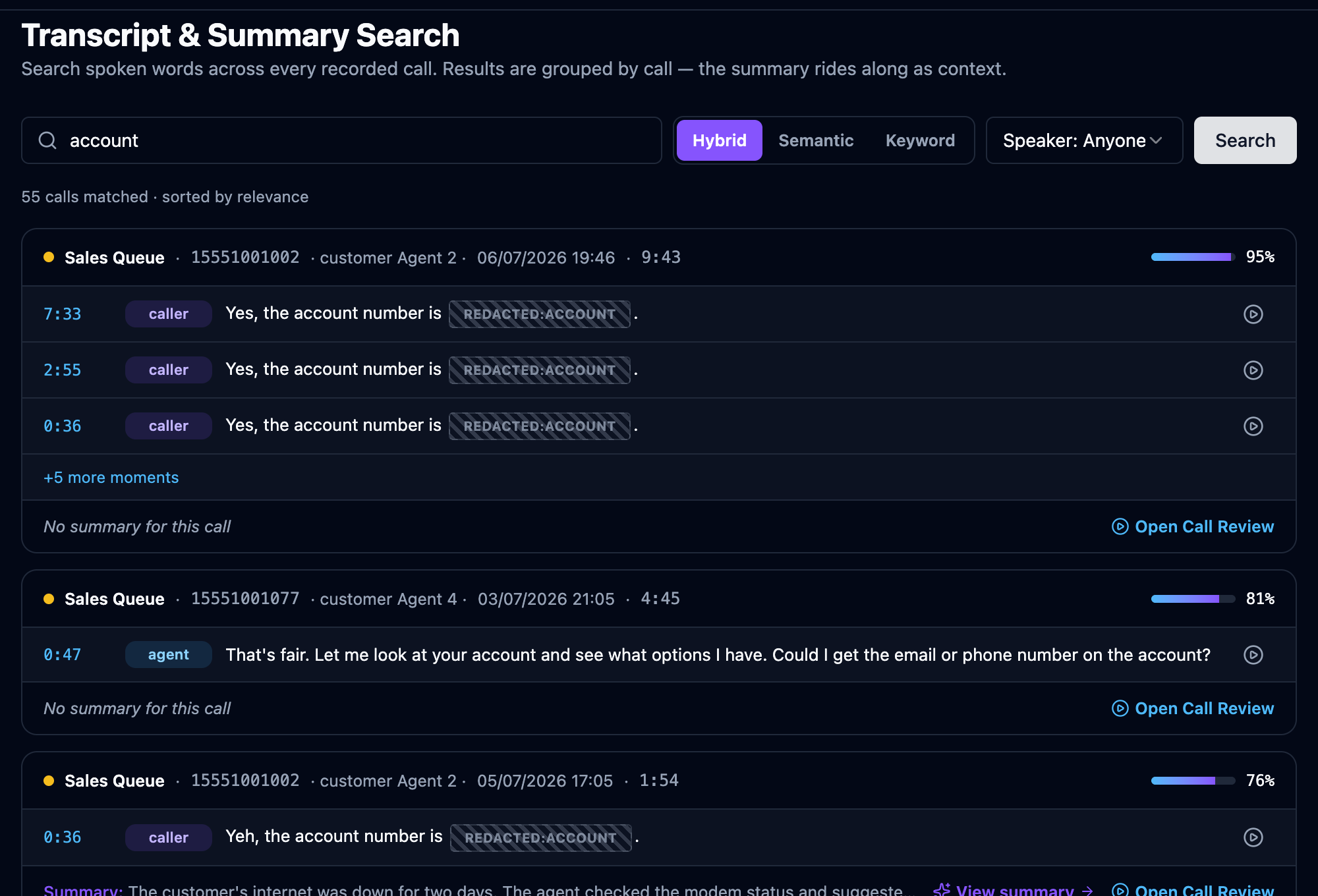 Transcript & Summary Search: search by meaning (Semantic), exact words (Keyword) or both (Hybrid). Every result is a whole conversation — its relevance, the exact moments that matched, and the AI summary riding along for context.
And it's all PII-safe
None of this leaks sensitive data. Because Orbit's PII redaction runs before anything is summarised, embedded or indexed, card numbers, CVV, SSN and email — plus any phone/name/address you configure — never appear in a summary, in the knowledge base, or in search results. You get the institutional memory without the liability.
Every call feeds the next one. A conversation is summarised, approved, and becomes knowledge; that knowledge surfaces on an agent's screen during the next similar call; that call, handled better, becomes the next summary. Your contact center gets measurably smarter every single day — with no extra work from your team.
Standards-based SIP/RTP core (RFC 3261 signalling, Opus/G.711/G.722/G.729 media with transcoding), WebRTC softphone with DTLS-SRTP and TURN, SIP-TLS/SRTP encryption end to end, AES-256 encrypted recordings, and built-in PCI-DSS and GDPR tooling — validated against Cisco CUCM and Avaya trunks. On top sits Comstice's own real-time ACD: automatic agent-state & queue control, RONA no-answer re-routing, a publish-instantly dynamic IVR, and per-queue dynamic wrap-up — plus an on-platform Conversational AI voice agent (ASR + local LLM with RAG and identity-gated lookups into your own CRM, neural speech synthesis) and a full analytics suite (live/post-call transcription, sentiment/emotion, AI call summaries, a self-building tag-scoped knowledge base fed by supervisor-approved summaries and your own PDF/Word documents, real-time agent-assist, combined semantic + keyword transcript & summary search, LLM-assisted QA, GLiNER PII redaction applied before anything is summarised or indexed).
3. Who uses Orbit? (Roles)
Orbit is multi-tenant: many companies share the same platform, but each company only ever sees its own data. There are five kinds of users, from the top of the tree down:
| Role | Who they are | What they do |
|---|---|---|
| Platform Admin | The Orbit operator (Comstice). | Manages every company on the platform, plans, licensing, and cluster health. |
| Reseller / Service Provider Admin | A partner who resells Orbit. | Manages the customer companies they signed up. Cannot see other resellers' customers. |
| Customer Admin | An administrator at a call center. | Sets up queues, call flows, users, trunks, and reports for their company only. |
| Supervisor | A team lead. | Monitors live calls, coaches agents, runs quality evaluations. |
| Agent | A person who answers calls. | Uses the softphone, sets their status, fills in wrap-up notes. |
What you can see and click is controlled by your Security Profile (your set of permissions). Two people in the same company can see completely different menus. See Organization & Access.
4. Signing in — every company has its own URL
This is important: each company logs in at its own web address. Orbit reads the company ("tenant") from the address itself.
| You are… | Your sign-in address looks like | Orbit detects |
|---|---|---|
| A customer named Acme | acme-orbit.comstice.com or acme.orbit.comstice.com | tenant = acme |
| A platform operator | orbit.comstice.com | no tenant — platform login |
When you open your company's address, the login screen shows your company name (e.g. "acme — Tenant Login") so you know you're in the right place.
To sign in:
- Open your company's Orbit address in a browser (Chrome recommended).
- Confirm the company name shown on the login screen is yours.
- Enter your username and password (given to you by your admin).
- Select Sign in.
After login, Orbit loads only the menus your role allows.
Your company administrator creates your account and gives you the address and credentials. Orbit does not let you self-register — see your admin.
5. A tour of the screen
Once you sign in, the layout is the same on every page — a sidebar on the left, a header across the top, the main content in the middle, and (if you can take calls) a call bar along the bottom with your live call controls that follows you as you navigate — see Handling Calls.
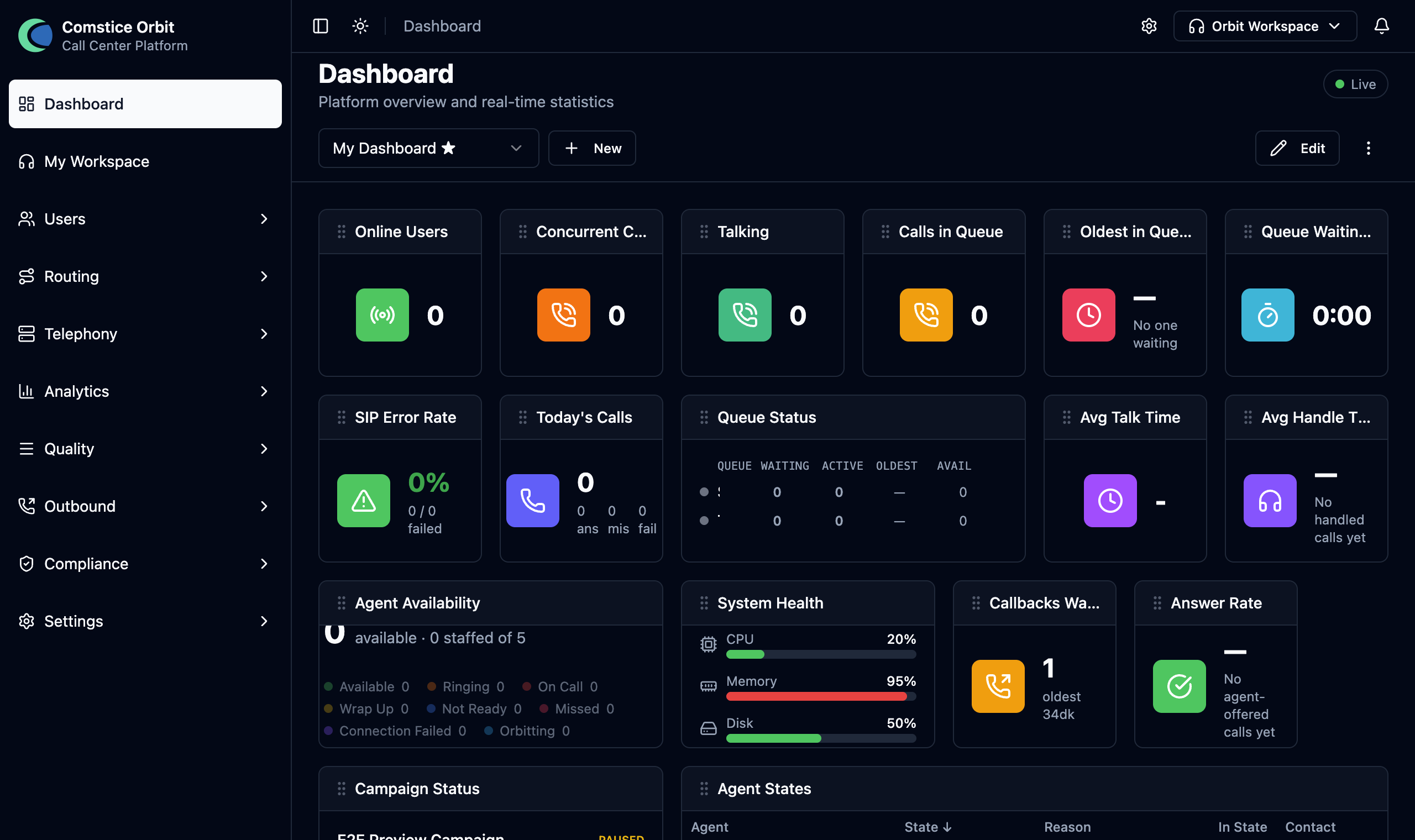
The sidebar (left) — your menus
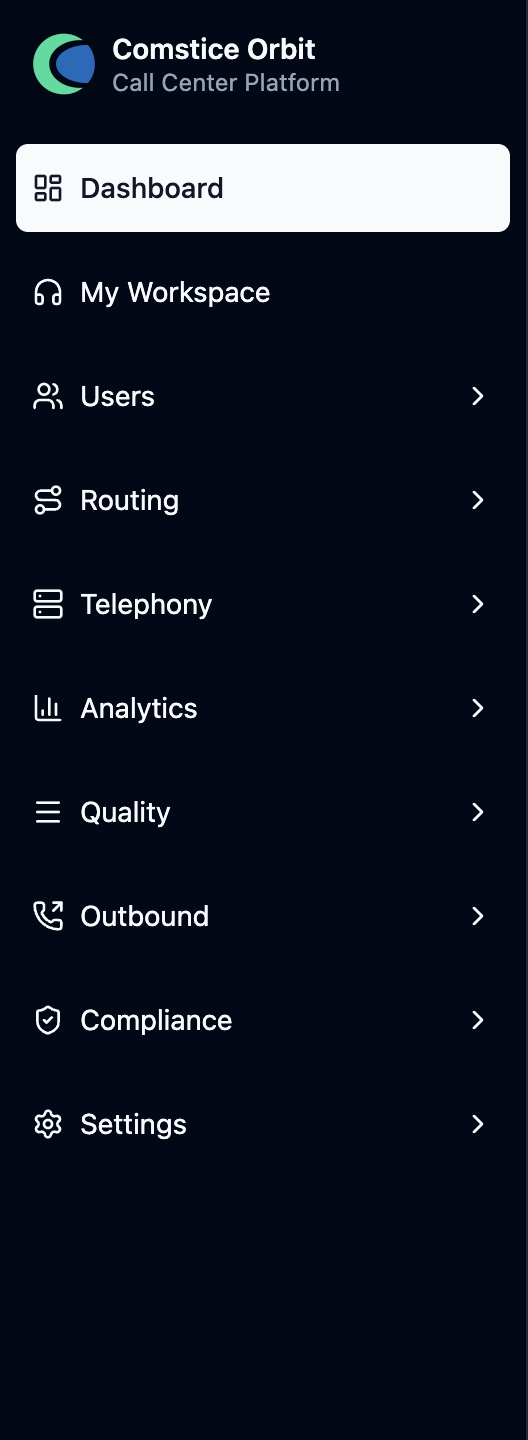
Your menus, grouped and expandable: Dashboard, My Workspace, Users, Routing, Telephony, Analytics, Quality, Outbound, Compliance, Settings. Only items you have permission for appear, so your sidebar may be shorter than a colleague's.
This guide is organized by topic, not by menu. To jump from a screen you're on to the chapter that explains it, use the Where to find it menu map in the Reference chapter.
The header (top) — context & controls

- Breadcrumb — where you are (e.g. Dashboard → Users → Edit).
- View-As (platform/reseller admins only) — temporarily "become" a customer account to see Orbit as they do.
- Notifications 🔔 and the theme toggle 🌙 (light/dark).
- Workspaces switcher (agents) — flip between the in-app softphone and the pop-out softphone (see Handling Calls).
6. Where to go next
I'm a company admin setting up from scratch — follow the chapters in this order; each step depends on the one before it:
- Organization & Access — create security profiles and your user accounts.
- Telephony — add your carrier/trunk and gateways.
- Call Flows — build and publish your inbound IVR.
- Telephony → Phone Numbers — add your DID and point it at the published flow.
- Queues & ACD — create the queues your flow routes to.
- Agents & Teams — create Routing Profiles (add your queues to them) and assign a profile to each agent. Skipping this is the #1 setup mistake — without a routing profile, no call can reach any agent, even with a perfect flow and queue.
- Test — have an agent sign in, go Available, and place a call to your DID.
Before you expect a live call to work, confirm all of these:
- ☐ Carrier + gateway added, provider pointed at your gateway IP.
- ☐ Call flow published (not just saved).
- ☐ DID added under the right carrier, pointing at that flow.
- ☐ At least one queue the flow transfers to.
- ☐ A routing profile containing that queue, assigned to an agent.
- ☐ That agent has softphone access (
orbit_panel.view) and a WebRTC phone type. - ☐ The agent is signed in and Available.
If any box is unchecked, the call won't complete — this list is the fastest way to find which link is missing.
Other roles:
- I'm a supervisor → Handling Calls and Quality Assurance.
- I'm an agent → Handling Calls.
- I care about privacy/compliance → Compliance & Data Governance.