Compliance & Data Governance
Call recordings and transcripts contain personal data, so Orbit gives you the tools to retain it responsibly, freeze it when needed, track who touches it, and honor data-subject requests. This chapter also maps each feature to the privacy standards it supports.
Orbit's compliance suite is being rolled out in phases. Each section is marked: ✅ Available (use it today), 🟡 Partial (some of it is live), or 🔜 Coming soon (planned, not yet live).
In the app: all under the Compliance menu — Retention Policy, Legal Holds, Access Log, Consent, GDPR / DSAR, and PII Redaction — plus the account-wide master switches on Settings → System Settings (§9).
1. Retention policies — ✅ Available
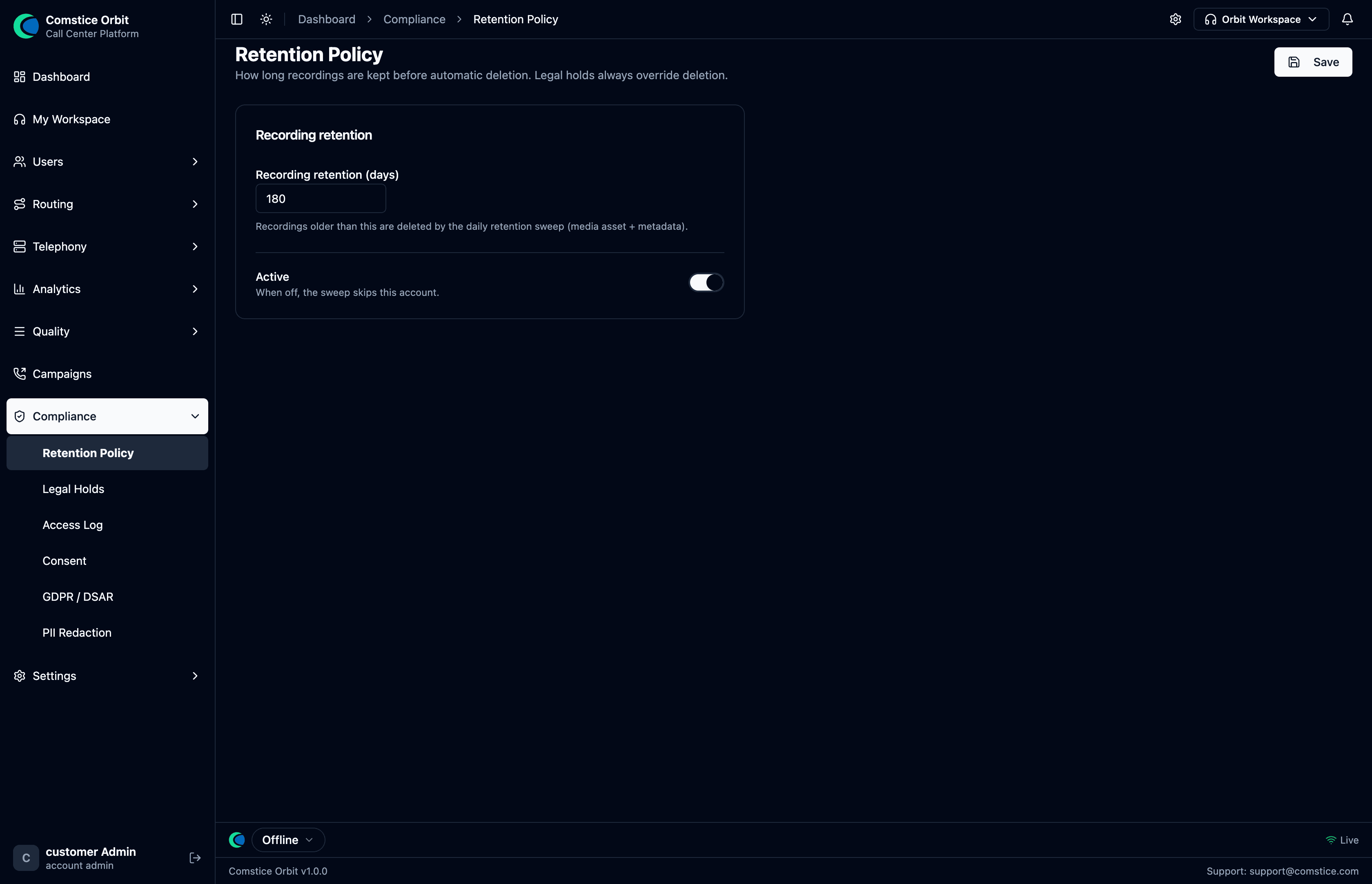 Retention days, recording-disclosure prompt, encrypt-at-rest flag, PII transcript redaction (on), and the recording consent gate (Explicit).
A retention policy controls how long recordings and transcripts are kept before automatic deletion. Set per company:
- Retention days — how long to keep recordings.
- Archive after N days (optional) — move older recordings to cold storage.
- Encrypt at rest — the master toggle lives on Settings → System Settings (§9); when on, recordings are encrypted on disk with AES-256-GCM as they're stored (each file sealed with an envelope key). The master key lives in the deployment's environment, never in the database or on the media disk. Encrypted files are transparently decrypted for authorized playback and transcription.
To set retention: Compliance → Retention Policy → set the number of days → Save. A scheduled sweep deletes anything past its retention date.
The deletion sweep supports a dry-run so you can preview exactly what would be deleted before enforcing the policy. Always preview first.
Retention respects legal holds (next section) — held recordings are never auto-deleted.
2. Legal holds — ✅ Available
A legal hold freezes recordings from deletion — for litigation, a dispute, or an investigation. While a hold is active, the retention sweep skips the held items no matter how old they are.
You can scope a hold to a single call, an agent, a date range, or the whole account. Placing and releasing holds is recorded in the audit log.
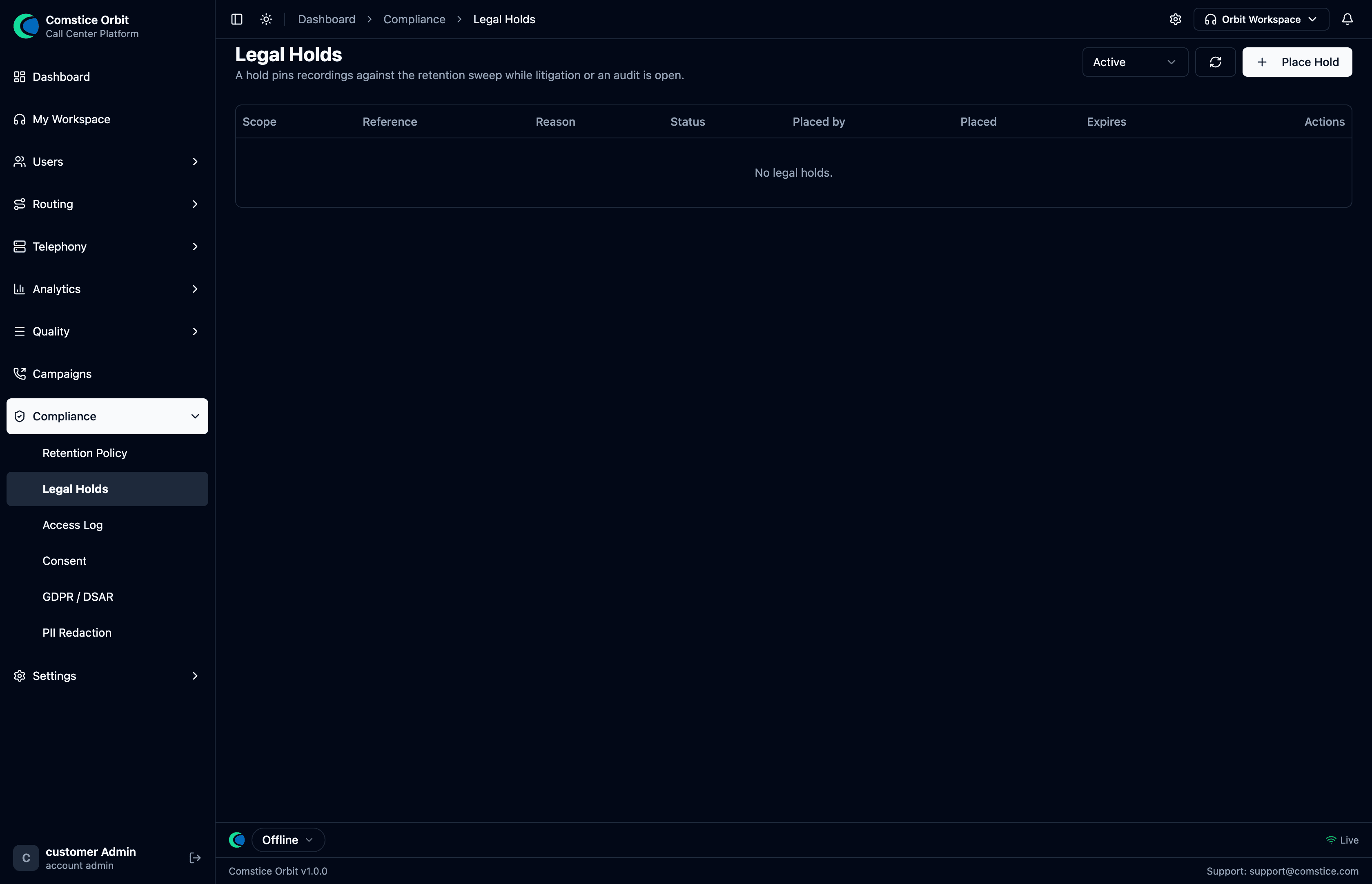 The Legal Holds list — each hold shows its scope, reason, who placed it, and status; filter by status and place a new hold.
To place a hold: open Call Review for the call → Place Hold; or Compliance → Legal Holds → Place Hold, and choose the scope.
3. Access Log & Audit Log — ✅ Available
Orbit keeps two audit trails, and it helps to know which is which. Both record the actor, the time, and (for access) the source IP — including when a platform/reseller admin was acting "as" a customer (View-As).
Access Log — who touched a recording
Compliance → Access Log records every sensitive action on recordings and transcripts: who listened, downloaded, exported, or viewed a transcript.
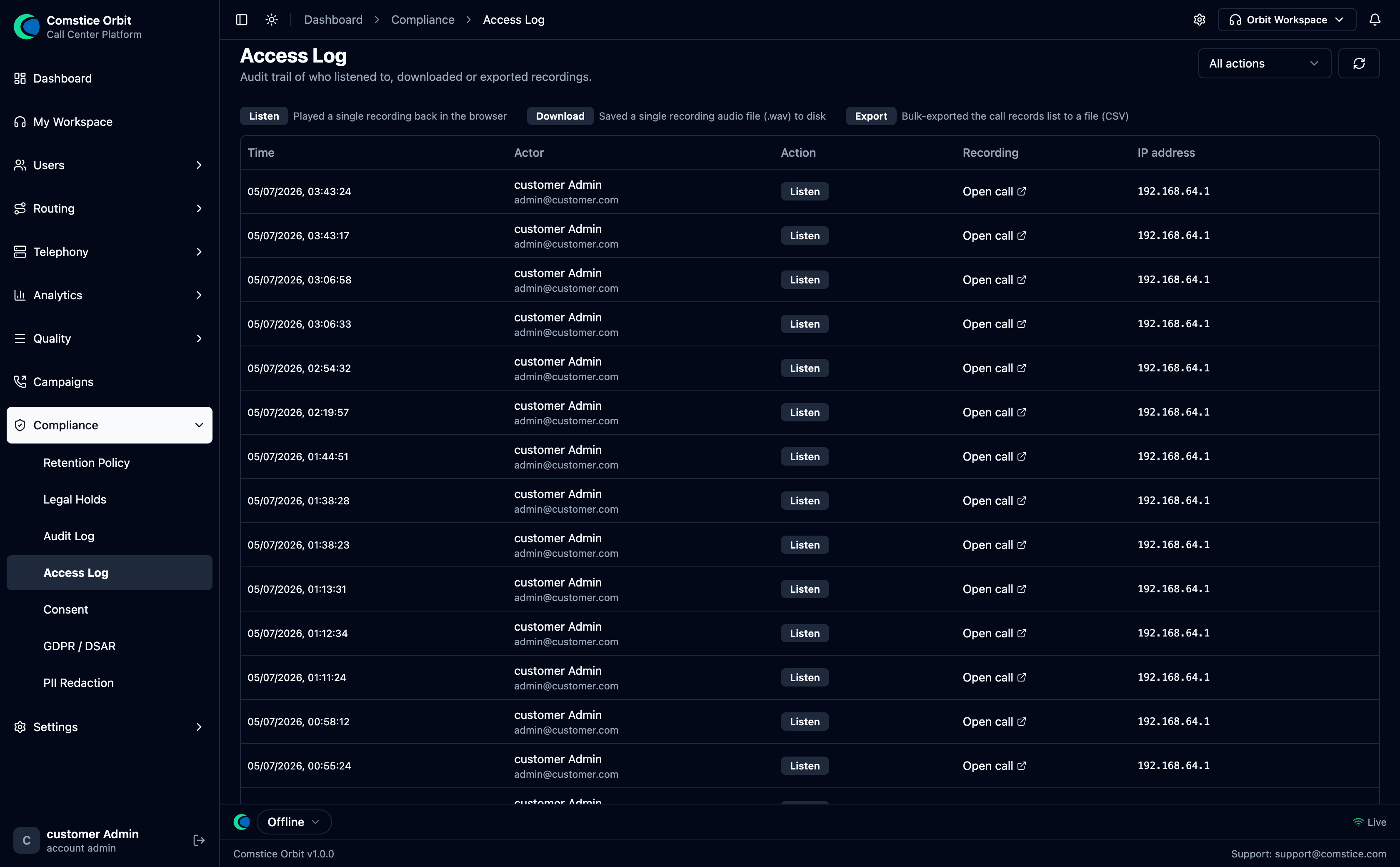 Every recording playback, download, export, and transcript view — with the user, action, time, and IP. Filter by user, action, or date.
Audit Log — who changed the configuration
Compliance → Audit Log records every management/configuration change
across the platform — so you can answer "who changed this queue?", "who reset that
password?", "who deleted that flow?". Each entry is resource.action with the
actor and timestamp.
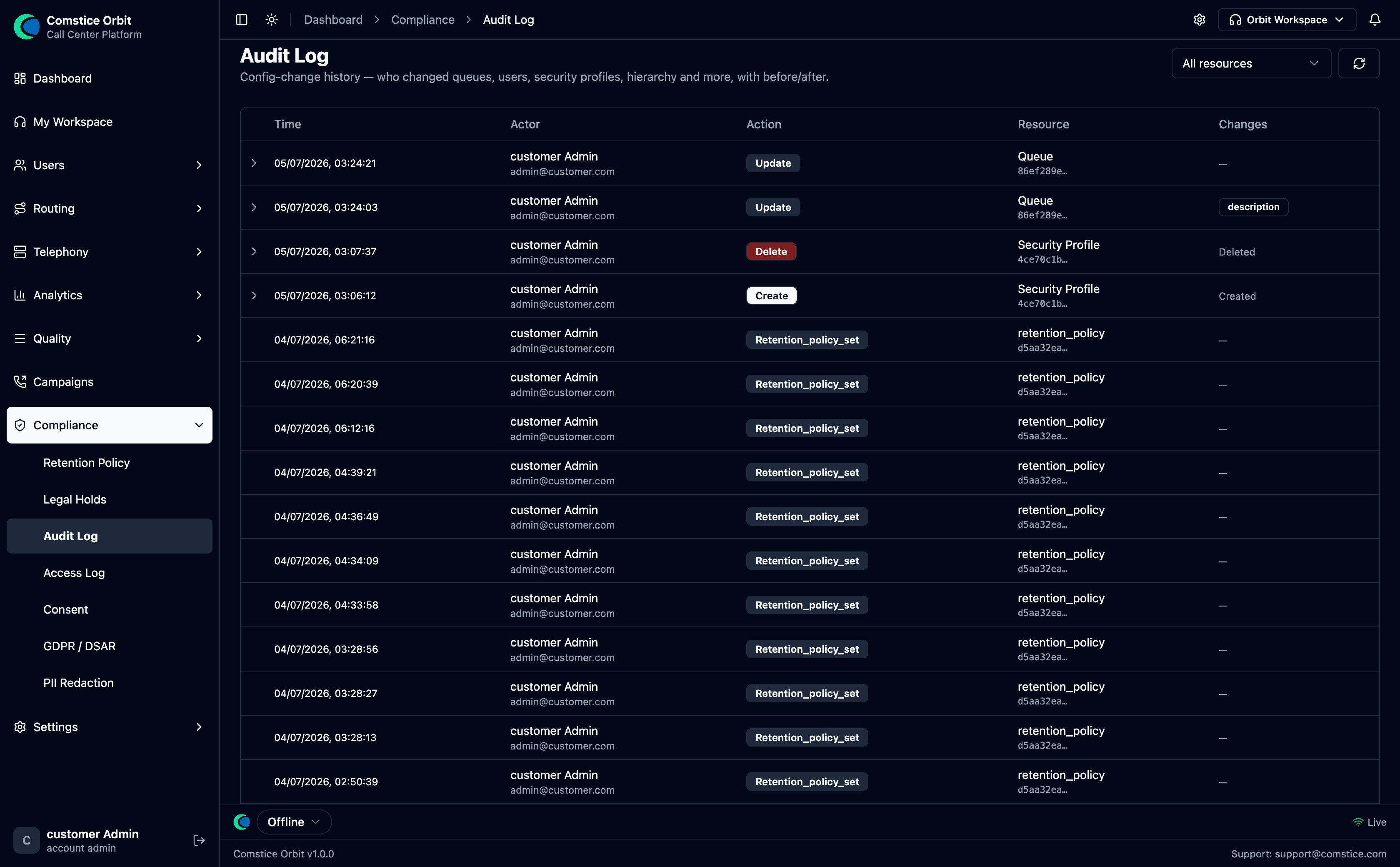 Config change history — who changed queues, users, security profiles, hierarchy and more. Each row shows the time, actor, action (Create / Update / Delete), and the resource affected; filter by resource type.
It covers 70+ event types, including:
| Area | Example events (resource.action) |
|---|---|
| Users & access | security_profile.create/update/delete; user.create/update/delete/password_reset/profile_assign/profile_unassign; hierarchy.node_create/node_update/nodes_update |
| Routing & telephony | queue.create/update/delete; routing_profile.create/update/delete/queue_unassign; phone_number.*; call_route.*; carrier.create/update/delete/gateway_create/gateway_delete; outbound_route.*; quick_connect.* |
| Workflow & content | campaign.create/update/delete/start/pause/stop/contacts_upload; business_hours.*; wrapup_form.create/update/delete/submission_delete; service_provider.* |
| Platform | account.apply_plan/change_plan/holder_change; plan.create/update |
| Compliance (also here) | consent_recorded/withdrawn; dsar_created/export/erase/erase_blocked/status; legal_hold_placed/released; retention_policy_set |
- Access Log = who read/exported a recording.
- Audit Log = who changed a setting (a queue, a user, a flow, a plan…).
Between the two, every read of sensitive media and every change to the system is attributable to a person and a time.
4. Consent — ✅ Available
Orbit captures a caller's consent to be recorded as hard evidence — the exact prompt they heard, the key they pressed, and (where available) the consent audio. Compliance → Consent has two views:
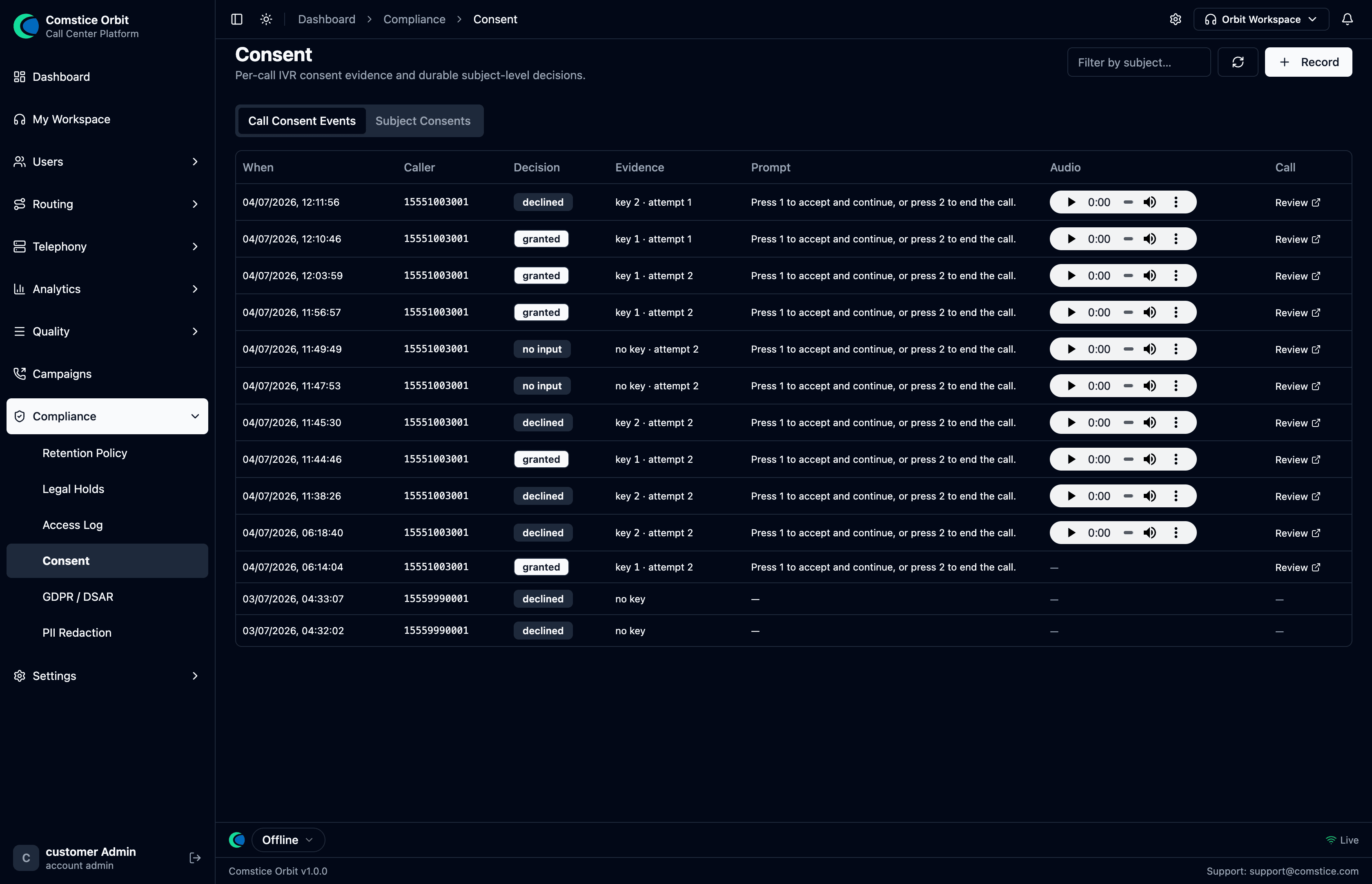 Call Consent Events: each row is one caller's decision — granted / declined / no input — with the evidence (which key, which attempt), the exact prompt they heard, a playable audio clip, and a Review link to the call.
- Call Consent Events — one row per attempt: When, Caller,
Decision (granted / declined / no input), Evidence (
key 1 · attempt 2), the Prompt text, the audio, and a link to the call. This is your immutable proof of what each caller agreed to. - Subject Consents — the durable, subject-level decision (this person's standing consent), separate from any single call.
How consent is enforced is set by the account's Recording consent mode on System Settings (§9):
- Flow-controlled — each flow decides via "Require caller confirmation (press 1)" on its recording block (the caller presses 1 to accept, 2 to decline).
- Forced — consent is always required before recording.
- Disabled — no consent gate.
When a caller declines, the flow follows the Consent Declined output of the Set Recording block — you decide what happens next.
5. DSAR — Data Subject Access Requests — ✅ Available
A DSAR is a person's legal request to see or delete the data you hold about them (GDPR Articles 15 and 17). Orbit tracks DSAR requests through their lifecycle (received → in progress → completed/rejected) with the statutory 30-day response clock, managed from a dedicated DSAR admin screen.
- Access requests — ✅ collect a subject's call records, transcripts, sentiment, and consents into an export.
- Erasure ("right to be forgotten") — ✅ automated anonymization across the subject's records. An erasure is automatically blocked while any legal hold covers the data, so litigation holds always win over a delete request.
- Rectification — ✅ a request to correct a subject's data. Orbit logs and tracks the request through the same lifecycle; the correction itself is applied by an admin to the relevant record, then the request is marked completed.
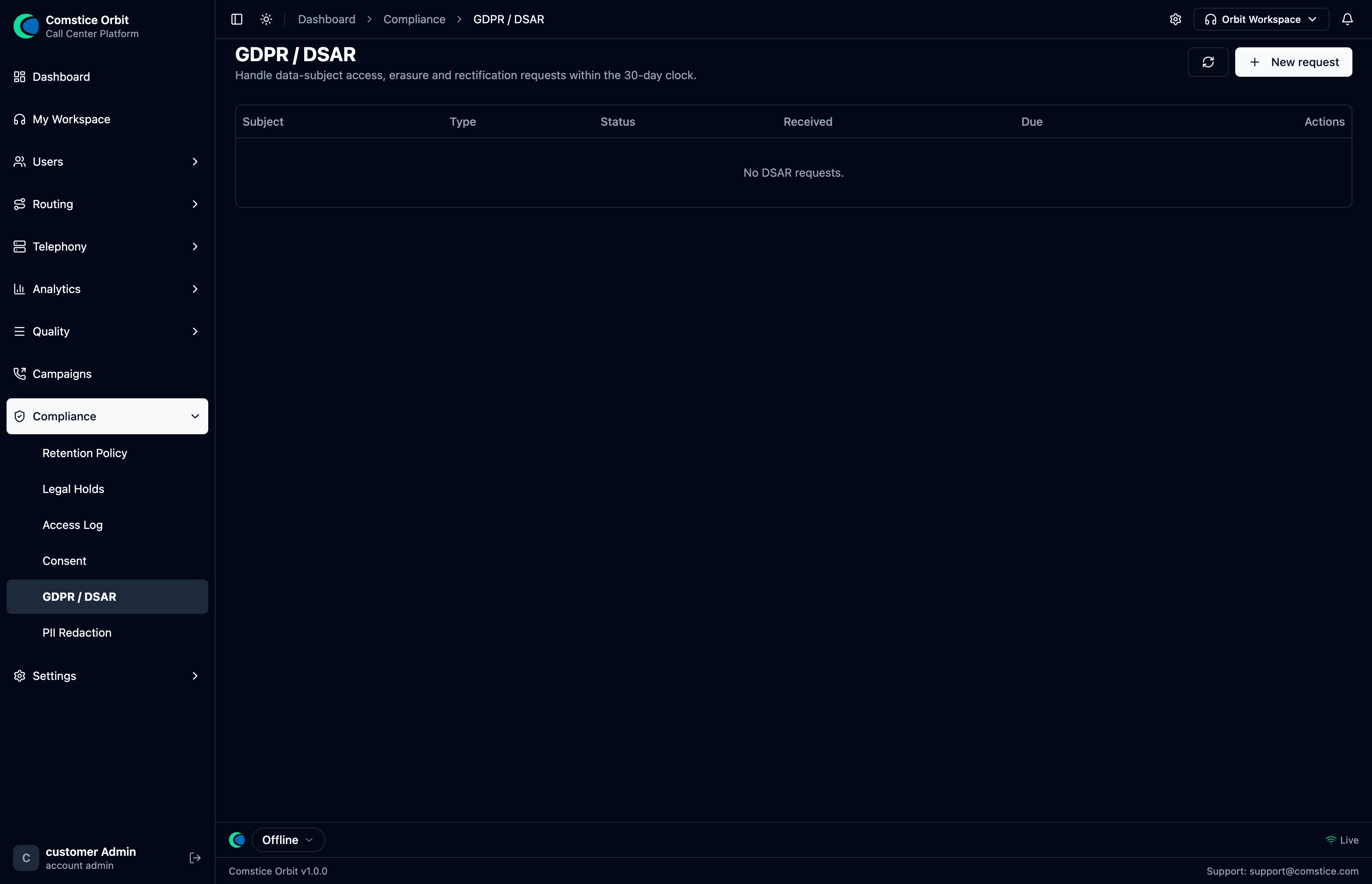 Each request shows its subject, type (access/erasure/rectification), status, received date, and 30-day due date. Erased subjects appear as
 [ERASED].
To handle a request: Compliance → GDPR / DSAR. The list shows every request with its type, status, and 30-day Due date; New request opens:
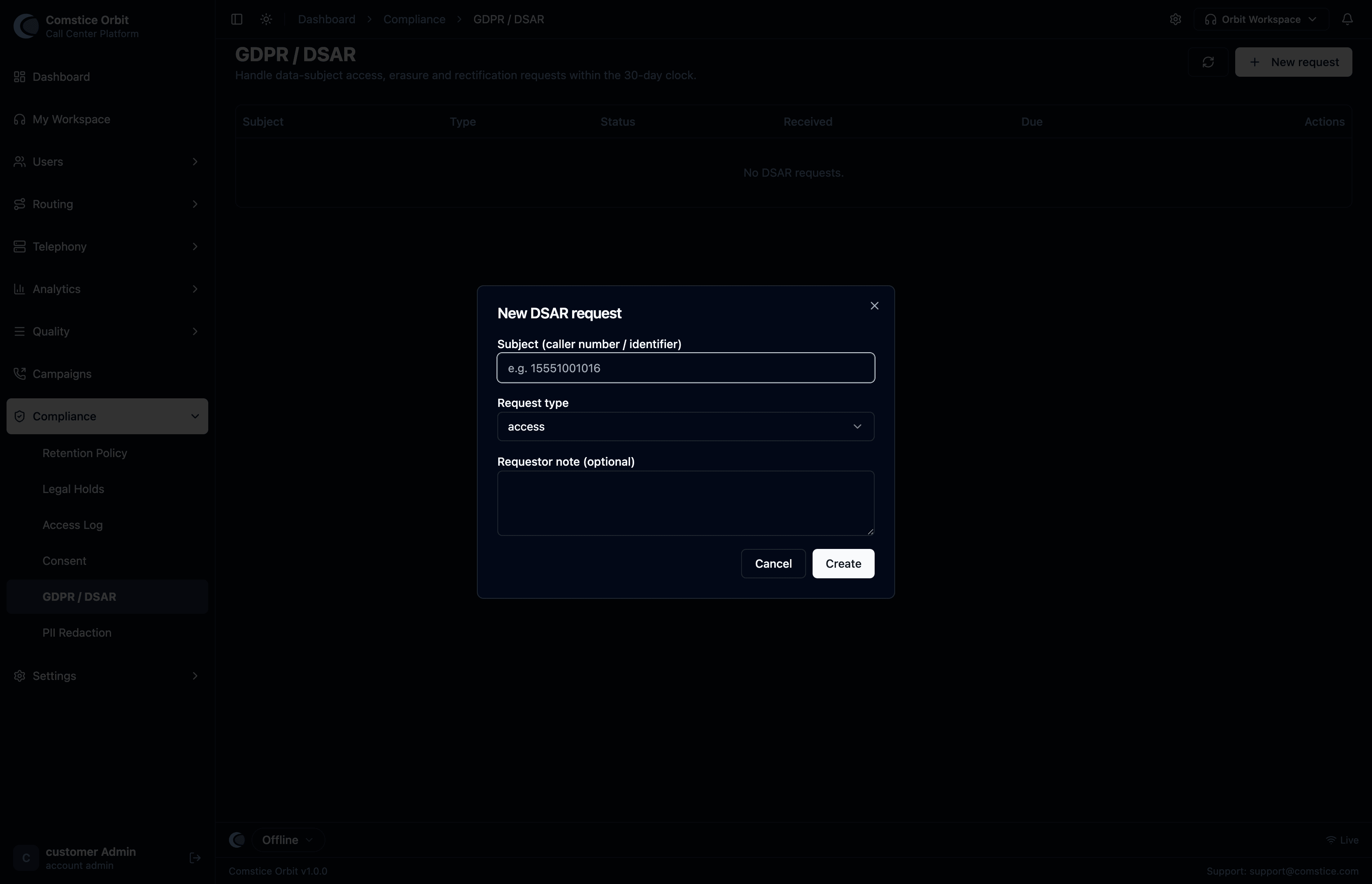 The New DSAR request form: identify the subject (caller number / identifier), choose the request type (access / erasure / rectification), and add an optional note. Orbit then starts the 30-day response clock.
| Field | What it does |
|---|---|
| Subject (caller number / identifier) | Who the request is about (e.g. the caller's number). |
| Request type | access (export their data), erasure (delete it), or rectification. |
| Requestor note | Optional free-text context for the request. |
Orbit then collects (access) or anonymizes (erasure) the subject's records and tracks the request to completion within the 30-day window. Each row can be exported, and its status set (received → in progress → completed).
6. PII redaction — ✅ Available
Removing personal data (card numbers, SSNs, etc.) from what you store and show. The Compliance → PII Redaction screen is where you choose what to mask — a matrix of data categories against where they're masked (Live views and/or stored Recordings/transcripts):
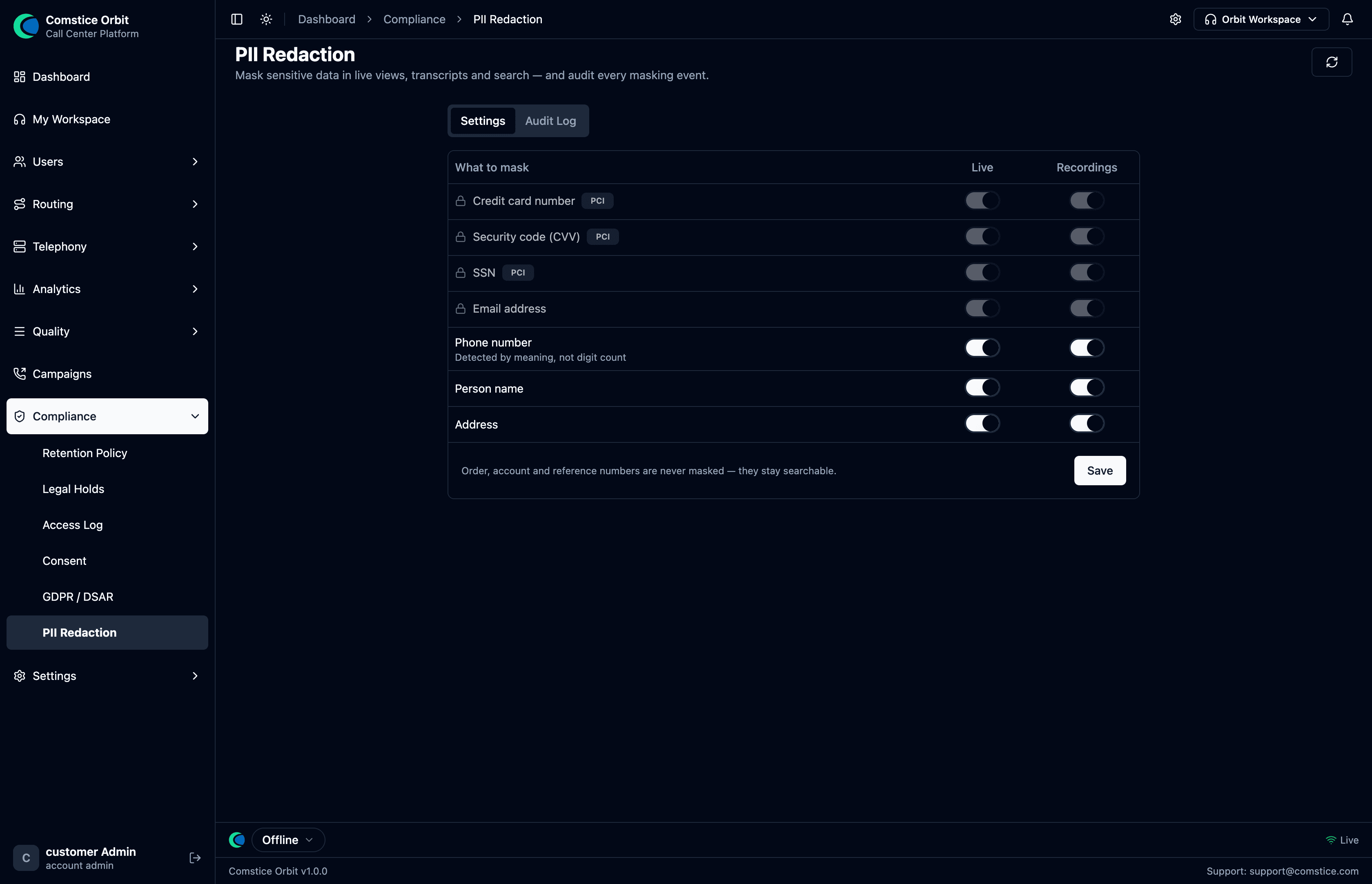 The redaction matrix. PCI categories (card, CVV, SSN) are always masked; the optional categories (phone, name, address) are yours to toggle. An Audit Log tab records every masking event.
| Category | Behavior |
|---|---|
| Credit card number / Security code (CVV) / SSN (PCI) | Always masked — you can't turn these off. Card numbers are validated with the Luhn checksum before masking, so real cards are caught without over-redacting random digits. |
| Email address | Masked (a locked default). |
| Phone number | Optional — detected by meaning, not digit count, so it catches spoken numbers. |
| Person name / Address | Optional — toggle per your policy. |
| Order / account / reference numbers | Never masked — they stay searchable so you can still find and match calls. |
Each category has independent Live and Recordings toggles, so you can (for example) mask a name in the live supervisor view but keep it in the stored transcript, or vice-versa.
This whole page is gated by the account's PII redaction master switch on System Settings (§9). When that's off, nothing is masked anywhere and this page is locked.
Two related capture-time protections:
- Secure card capture (secure-DTMF) — the Secure Input (PCI) call-flow block masks the recording while a caller types sensitive digits, so card numbers never reach the stored audio.
- Full payment auto-pause / DTMF clamp — 🔜 automatically detecting any payment moment (beyond the Secure Input block) and clamping DTMF tones end-to-end is being expanded.
PII Audit Log — every masking event, logged
The screen's Audit Log tab records every masking event — so you can prove exactly what was redacted, where, and when.
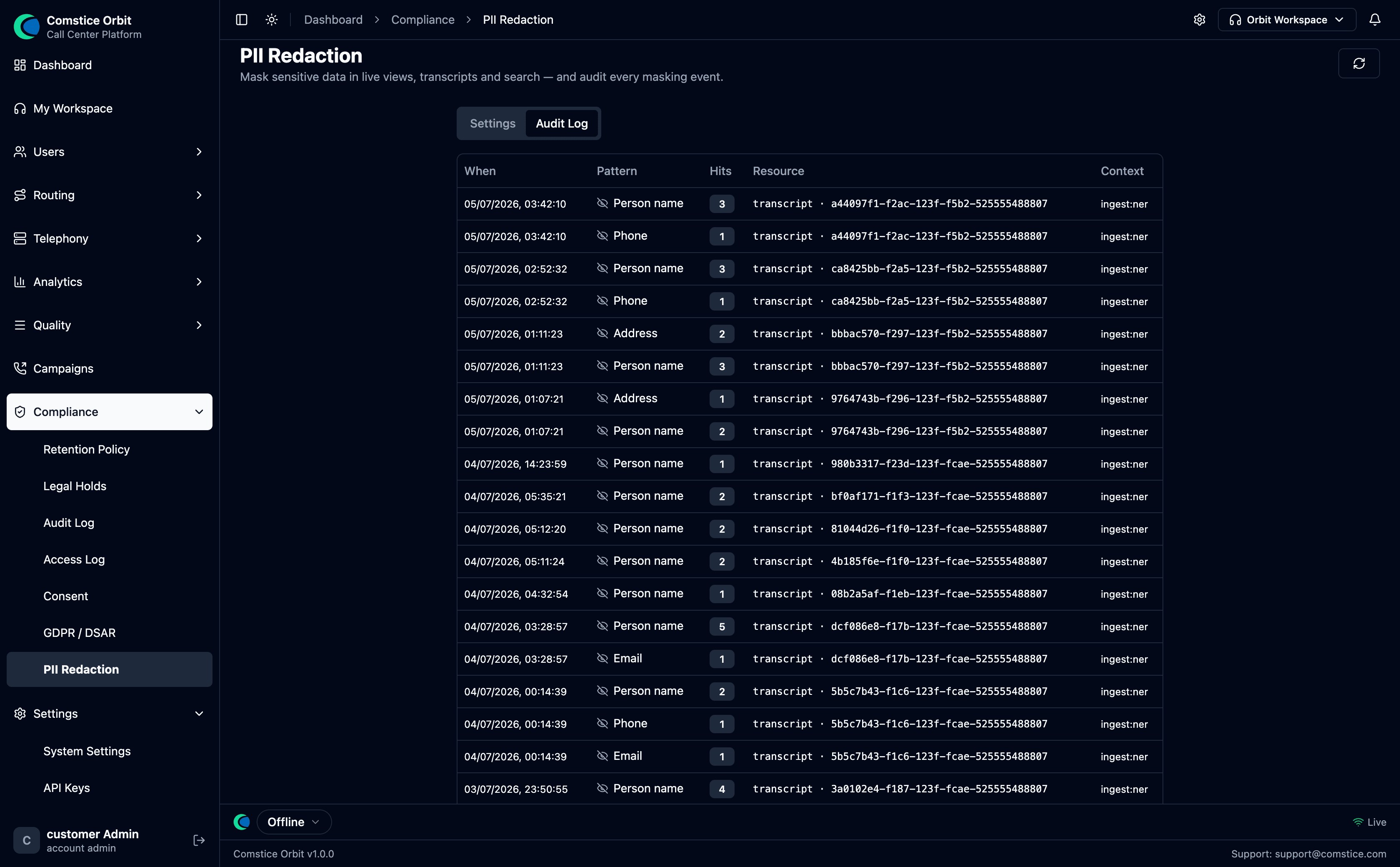 One row per detection: When, the Pattern masked (Person name, Phone, Email, Address…), the number of Hits, the Resource it was masked in (the transcript and its call id), and the Context (e.g.
 ingest:ner — masked by the NER model during ingestion).
| Column | What it shows |
|---|---|
| When | Timestamp of the masking event. |
| Pattern | Which category was detected and masked (Person name, Phone, Email, Address, card/CVV/SSN…). |
| Hits | How many instances were masked in that resource. |
| Resource | What was masked — the transcript and the call it belongs to. |
| Context | Where the masking ran (ingest:ner = the NER model at transcript ingestion). |
Together with the Access Log (recording access) and the Audit Log (config changes, §3), this closes the loop: not only who saw the data and who changed the settings, but exactly what sensitive data was masked on every call.
7. Security posture
| Control | Status |
|---|---|
| Encryption in transit (TLS/WSS signaling, SRTP/DTLS media) | ✅ Available |
| Multi-tenant isolation (every record scoped to its account) | ✅ Available |
| Role-based access (Security Profiles + permission engine) | ✅ Available |
| Database row-level security (RLS) | ✅ Live — org-scoped policies enforce tenant isolation at the database; per-router ownership checks (IDOR hardening) are being extended |
| Encryption at rest (stored recordings) | ✅ Available — when the retention policy's Encrypt at rest toggle is on, recordings are sealed with AES-256-GCM on disk (§1); the master key is held in the deployment environment, not the database |
8. How Orbit maps to privacy standards
This is a readiness summary, not a certification claim.
| Standard | What it covers | Orbit today |
|---|---|---|
| GDPR (EU) | Access, erasure, consent, retention, audit | ✅ Access, automated erasure, consent, retention, audit all live |
| CCPA (California) | Access & deletion rights, audit | ✅ Access + deletion via DSAR; audit live |
| HIPAA (US health) | PHI access audit, encryption, retention | ✅ Access audit, retention, and at-rest recording encryption (AES-256-GCM) live; encryption-in-transit live |
| PCI-DSS (card data) | Keep card data out of recordings | 🟡 Secure-DTMF card capture (recording masked) + transcript card-number redaction (Luhn) live; 🔜 broader automatic payment-pause |
| SOC 2 | Isolation, audit, access control | ✅ Tenant isolation (RLS), audit trail, and RBAC live; IDOR hardening ongoing |
Talk to your account team before relying on any specific standard for a regulated workload — several controls above are still being rolled out.
9. Account settings (System Settings) — ✅ Available
Some controls apply to your whole account, not one recording or one flow. They live on Settings → System Settings (admin-only), with a History tab that records every change.
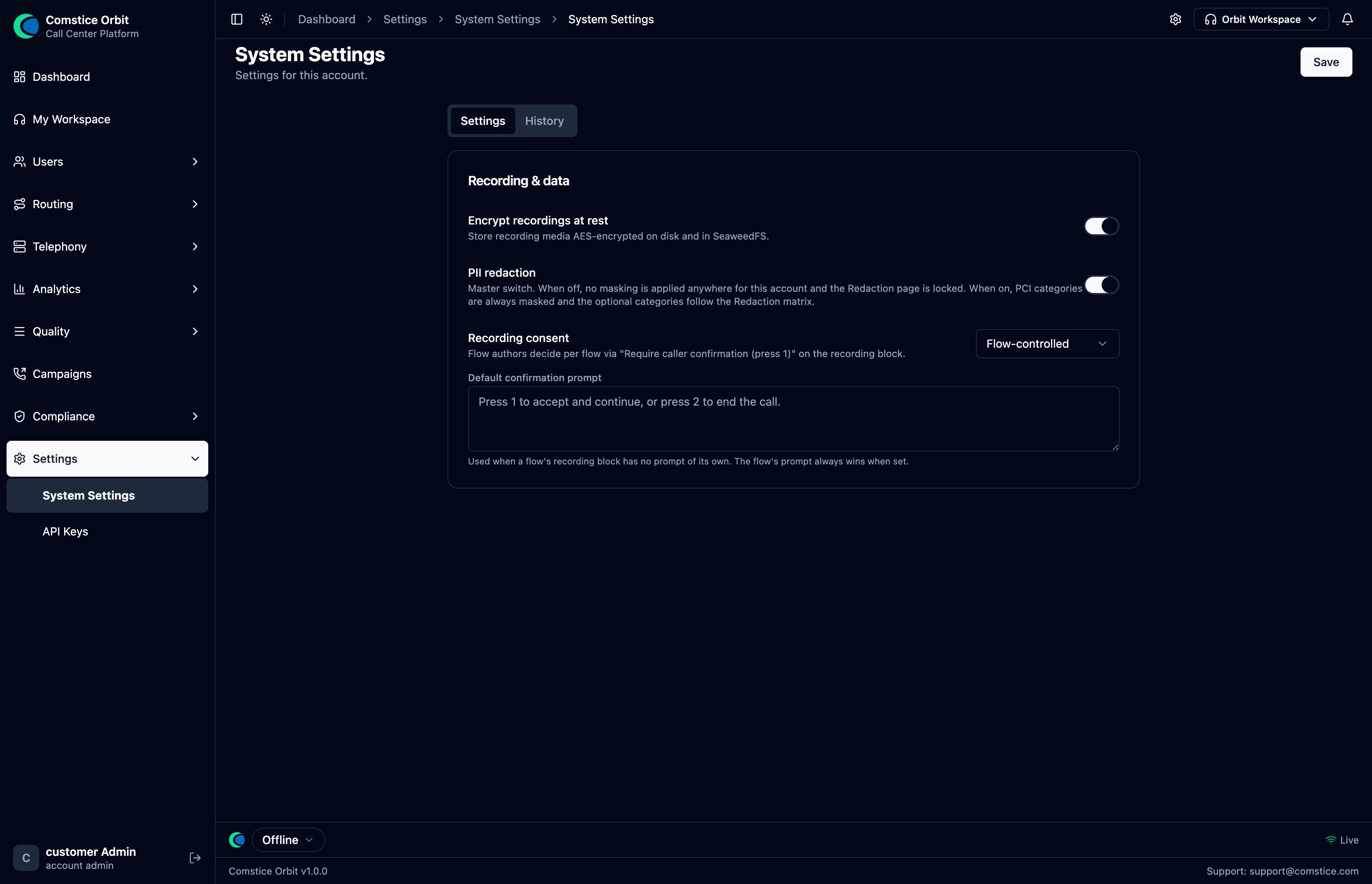 The Recording & data section: encrypt-at-rest, the PII-redaction master switch, and the account's recording-consent mode with a default confirmation prompt.
| Setting | What it does |
|---|---|
| Encrypt recordings at rest | Master toggle — when on, recording media is stored AES-256-GCM encrypted on disk and in object storage (SeaweedFS). This is the switch behind the at-rest encryption in §1/§7. |
| PII redaction (master switch) | When off, no masking is applied anywhere for the account and the PII Redaction page (§6) is locked. When on, PCI categories (card/CVV) are always masked and the optional categories follow your redaction matrix. |
| Recording consent | The account's consent mode. Flow-controlled means each flow decides via "Require caller confirmation (press 1)" on its recording block. |
| Default confirmation prompt | The wording played when a flow's recording block asks for consent but has no prompt of its own (the flow's own prompt always wins when set). |
Because these are account-wide, changing them affects every call and every flow — hence the audit History. Set them once during onboarding and revisit only when your compliance posture changes.