Developer & Integration
This appendix is for engineers integrating with or operating Orbit. Each feature is marked ✅ Available, 🟡 Partial, or 🔜 Not yet wired so you can build against what's real today.
Some surfaces below ship a working data model and management API but aren't fully wired end-to-end yet (e.g. the campaign dialer, programmatic API-key auth). They're flagged so you don't build against a stub.
1. Authentication — ✅ Available
- Model: stateless JWT (HS256), sent as
Authorization: Bearer <jwt>. - Tenant resolution: the FQDN subdomain identifies the tenant
(
acme-orbit.comstice.com→ tenantacme); login isPOST /auth/login. - Passwords: hashed with bcrypt. Token lifetime is short-lived (the login
service defaults to ~8 hours);
/auth/refreshre-issues,/auth/logoutis a client-side no-op (stateless). - Internal SSO:
/auth/exchangetrades a valid token for a fresh session (admin ↔ agent) — used by the Agent SDK; not an external IdP. - Token storage (web UI): browser
localStorage(admin_auth_token, and a separate agent token). No cookies. - MFA / SSO (SAML/OAuth/OIDC): 🔜 not present today.
All protected endpoints (/api/...) require a Bearer JWT and run on
tenant-scoped connections (row-level security + per-router ownership checks).
2. API keys — 🟡 Partial (issue & manage; programmatic auth not yet wired)
You can mint and revoke scoped API keys from Settings → API Keys (or REST):
| Aspect | Detail |
|---|---|
| Format | sk_… (32 random bytes, base64url). Shown once at creation. |
| Storage | Only the SHA-256 hash + a 10-char display prefix are kept. |
| Scopes | Free-form list (e.g. calls, recordings, users, queues). |
| Expiry | Optional expires_at. |
| Gating | Requires the api-access license + api_keys.create / api_keys.delete permission. |
| REST | GET / POST / DELETE /api/api-keys. |
Keys are issuable and validatable in the data layer, but no public endpoint
authenticates with an API key yet — every real API today is JWT-Bearer (§1).
Treat API keys as forward-looking until an x-api-key auth path is confirmed for
your deployment.
3. Programmable call handling — ✅ Available
An Application can handle a call three ways: if call_flow_sid is set, the
visual flow engine runs; otherwise the Application is driven
by a webhook / WebSocket handler (call_hook_url) or a static verb list
(app_json). (Confirm the exact precedence for your build if you mix them.)
Webhook model (jambonz-style):
- Request: method =
call_hook_method(defaultPOST), JSON body:{ "callId", "traceId", "accountSid", "applicationSid","from", "to", "direction", "callStatus": "ringing" } - Headers:
Content-Type: application/json,User-Agent: SaaS-SBC/1.0, optional Basic auth. (HMACX-Signaturebody-signing is supported in the client but there's no UI to store a webhook secret yet, so it's dormant today.) - Response: HTTP 2xx with a JSON array of verbs to execute. HTTP path
retries with backoff (10s timeout); a
ws(s)://URL upgrades to a bidirectional WebSocket (subprotocolaudio.drachtio.org) that auto-reconnects. - Status callbacks:
call_status_hook_urlreceives POSTed call-status updates.
This is fully implemented — point an Application at your service to drive calls programmatically.
4. Event stream (RabbitMQ) — ✅ Available (core)
Services communicate over RabbitMQ topic exchanges (durable). Subscribe with a
binding key to consume; integrations typically listen on call.events and
media.events.
| Exchange | Key routing keys | Meaning |
|---|---|---|
| call.events | call.started · call.answered · call.ended · call.hold · call.resumed · call.control.start/stop · call.originate | Call lifecycle, hold/resume, supervisor leg, outbound dial request. |
| media.events | media.recording.completed → media.transcription.complete (plus *.failed variants) | Recording + STT pipeline (recording done → transcription → transcript ingest). |
| system.events | agent.state.changed · agent.supervisor.coaching · agent.offer/accept/reject/missed/... · queue.caller.enqueued/dequeued/abandoned · queue.assignment · system.service.up/down · system.config.changed · routing.config.changed · interaction.* (call-journey timeline) | Agent delivery handshake, queue/ACD, service discovery, config reload, interaction events. |
| user.events | user.registered/unregistered/status_change | SIP registration. |
| sentiment.events | sentiment.score/emotion/summary | AI sentiment. |
A few keys are defined but not emitted yet (e.g. user.*, sentiment.*,
queue.metrics, call.transferred/ringing/failed, some interaction.*
variants) — sentiment currently lands in call_records columns via the
report/live-NLP path rather than on the bus. Build against the keys you can
observe in your environment.
5. SIP trunk interop — 🟡 Partial (plaintext today)
| Area | Reality |
|---|---|
| Transports | UDP + TCP (inbound 5060). TLS/SIPS listener is disabled today. |
| Codecs | OPUS, PCMU, PCMA, G722, G729 (FreeSWITCH transcodes between them). |
| Media security | SRTP/DTLS disabled — trunk media is plain RTP. (Browser agent legs use DTLS-SRTP via WebRTC; the trunk side is RTP/AVP.) |
| Inbound auth | IP-based only — the source IP is matched to a carrier gateway (exact /32 or CIDR). Outbound REGISTER credential columns exist but registration is not yet implemented. |
| DTMF | RFC 2833 (PT 101), liberal DTMF. No SIP INFO DTMF. |
| Keepalive | Gateway OPTIONS health probe every 30s (→ system.gateway.up/down). |
| Limits | Concurrent-call limiter per account and per service-provider (Redis-backed, maxConcurrentCalls, 0 = unlimited). No CPS throttle — concurrency only. |
Provisioning a trunk: create a Carrier + Gateway(s) in Telephony. Because inbound is IP-auth, give your provider the Orbit gateway IPs and configure the gateway's IP/netmask in Orbit.
6. Agent SDK — ✅ Available
sbc-agent-sdk is a headless npm package: it handles login, agent state,
call control, and audio; you render your own UI. Web and React Native are
supported via pluggable media adapters (SIP.js is compiled inside the bundle).
import { AgentSession } from 'sbc-agent-sdk';
import { WebMediaAdapter } from 'sbc-agent-sdk/web';

const agent = new AgentSession({ fqdn: 'acme-orbit.comstice.com' }, new WebMediaAdapter());
await agent.login(username, password);   // or agent.exchange(adminToken)
await agent.connect();                    // opens WS + registers softphone
agent.on('offer', (call) => { /* show incoming-call UI */ });
agent.on('call',  (c) => { /* phase: connecting → connected → ended */ });
agent.on('supervisor', (s) => { /* whisper / barge / intercept badge */ });
await agent.setState('available');
- Methods:
login,exchange,connect/disconnect,logout,setState(available|not_ready|wrap_up|offline, reason?),accept/reject,hold/resume,mute(on),hangup,setOutput(deviceId),getWrapupForm(id),submitWrapup({...}). - Events:
connection,state,offer,call,media,supervisor,takeover,error. - Auth is FQDN-scoped (tenant from the subdomain); the backend is unchanged.
React Native needs
react-native-webrtc+react-native-incall-manager.
Use it to embed the Orbit softphone into your own web or mobile app.
7. Outbound campaigns — 🔜 Definitions only (no dialer yet)
The Campaigns area + REST manage campaign definitions and contact lists
(dialer_mode preview/progressive/power, statuses, caller ID, trunk, assigned
agent groups, per-contact attempt/result tracking). However, no dialer service
originates campaign calls yet — the automated preview/progressive/power engine
is not implemented. Treat campaigns as a configurable model today.
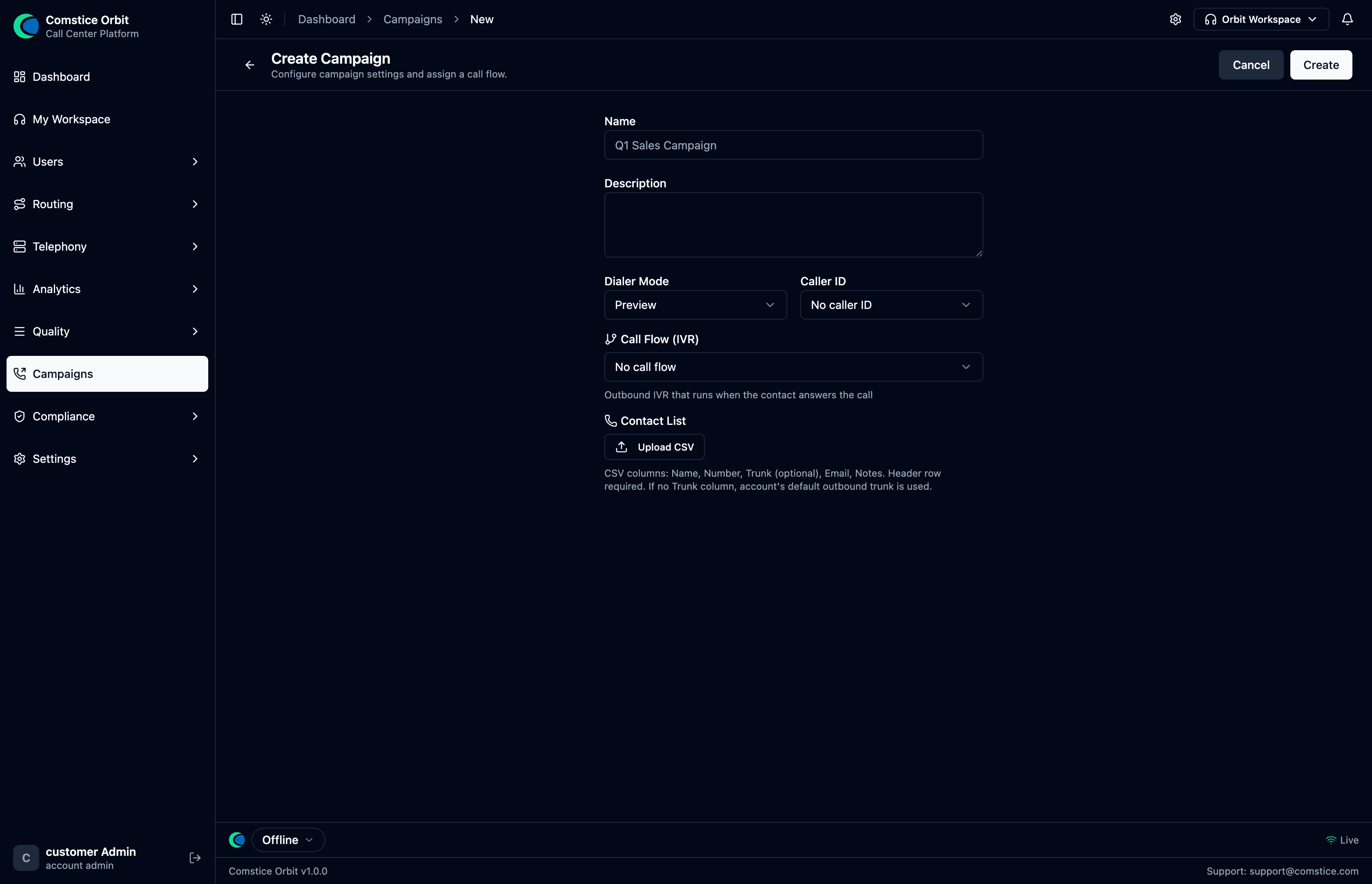 The campaign definition form: name, dialer mode (preview / progressive / power), caller ID, outbound trunk, and the agent groups the campaign is assigned to. The definition is stored and manageable today; the dialer that would act on it is not yet wired.
| Field | What it does |
|---|---|
| Name | The campaign's name. |
| Dialer mode | preview / progressive / power — how aggressively the (future) dialer would place calls. |
| Caller ID | The number shown to called contacts. |
| Trunk | The carrier/trunk the campaign would dial out on. |
| Agent groups | Which agent groups handle the campaign's connected calls. |
8. Queue callback — 🟡 Partial
- ✅ Dispatcher works: when an agent goes available, the callback dispatcher
picks the highest-priority eligible callback for that agent's queues
(
ORDER BY priority DESC, requested_at ASC, multi-instance-safe withSKIP LOCKED), marks it dialing (max 3 attempts), and publishescall.originateto dial the customer and connect the agent. - ✅ REST lifecycle:
POST/GET/DELETE /api/queues/:queueId/callbacks(licensequeue-mgmt). - 🔜 Caller-facing "press 1 for a callback" in-queue creation is not wired yet — today callbacks are created via the REST endpoint, not by the IVR.
9. Least-cost routing (LCR) — ✅ Available
Outbound carrier selection beyond simple priority routes:
lcr (a named plan, account-level or platform-level) → lcr_routes
(regex prefix + priority) → lcr_carrier_set_entries (carrier + priority +
workload weight). For a dialed number, Orbit picks the first plan/route whose
regex matches, then tries its carriers in priority ASC, workload DESC order with
failover. Used automatically by the outbound path.
10. CDR & data export — ✅ Available
| Table | What it holds |
|---|---|
call_records | The primary CDR — legs, account/carrier, timestamps, ring/talk durations, status, hangup cause, sentiment columns, agent/queue ids, feature-presence flags, plus an external public_id (uuid) used in API/review URLs. |
interaction_summary | One row per interaction (trace_id) with derived KPIs: IVR ms, queue wait, connect latency, talk, hold count/time, ACW, AHT, transfer count, abandoned/short-abandon, disposition. |
interaction_segment | Per-agent ownership windows (talk/hold/ACW/handle, transfer/conference flags). |
usage_meters | Per-org/product usage roll-up for license enforcement (not per-call). |
Export: GET /api/call-records/export (recordings.view) returns CSV
(capped 10,000 rows; the export is written to the compliance access log). Columns
merge interaction_summary KPIs: Time, Direction, Caller, Callee, Agent, Queue,
Status, Journey, Talk, Queue Wait, Hold Count, Hold Time, AHT, Abandoned,
Disposition, Sentiment, Recording, Call ID. There is no general CDR push / SFTP
feed today — pull via this endpoint.
11. On-prem / offline operation — ✅ By design
Orbit is built to run air-gapped:
- Docker Compose uses pre-built
image:only —build:is forbidden in compose. Anything needing the internet (npm/pip install, model download) happens only at image-build time, never at runtime. - AI models (STT/TTS/sentiment) are bundled into images; no runtime downloads.
- State lives in PostgreSQL + Redis; runtime config is DB-driven
(
cluster_config), so services need no external config fetch at boot.
This makes Orbit deployable in isolated/regulated networks with no outbound internet at runtime.