Programmable Voice — Answer Calls From Your Own Server
Most numbers in Orbit are answered by a call flow you draw in the editor. Programmable Voice is the other option: Orbit posts the incoming call to your HTTPS endpoint and runs the instructions your server returns.
Reach for it when the decision needs data or logic that lives in your systems — routing by account balance, a rota held in your own database, a queue chosen by an order's status. Everything else — recordings, transcripts, analytics — keeps working exactly as it does for any other call.
In the app: Telephony → Phone Numbers → open a number → How inbound
calls are answered. It is a licensed add-on (programmable-voice); on an
account without it the screen simply offers the call-flow field.
1. Point a number at your server
-
Open Telephony → Phone Numbers and open the number. (Add the number first — the answering mode is set on a saved number.)


-
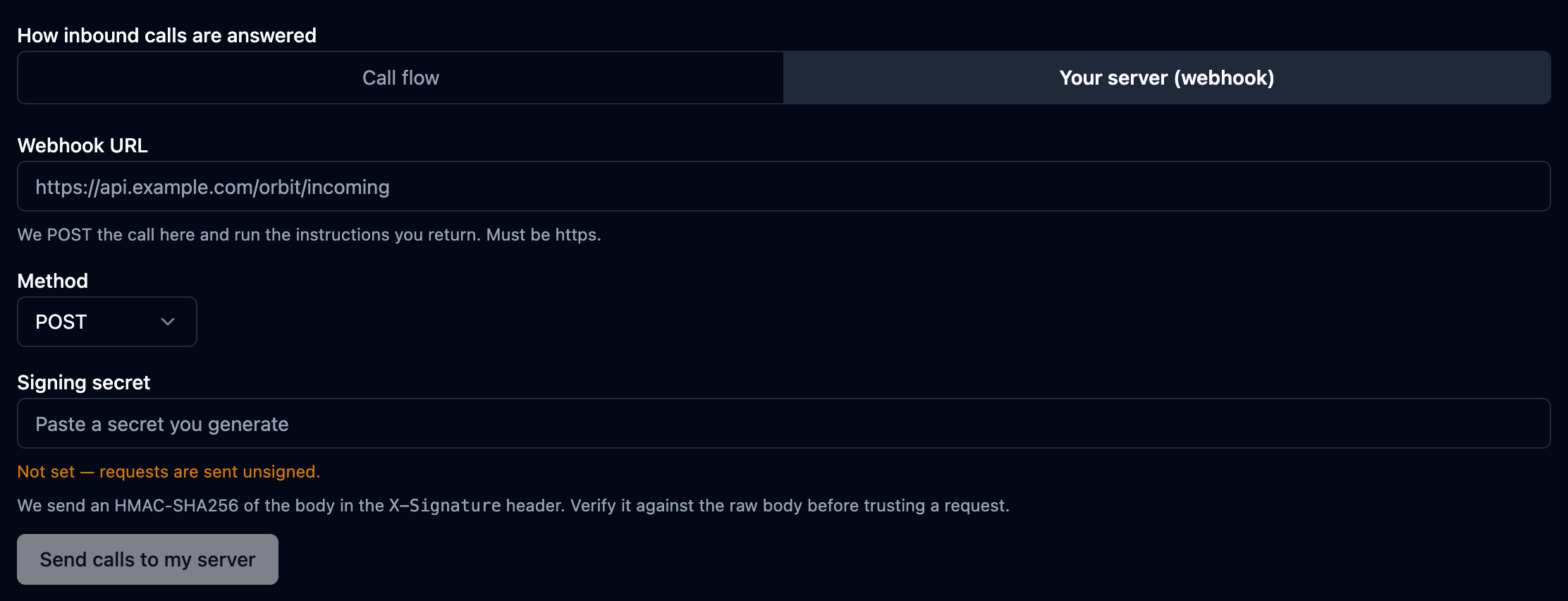
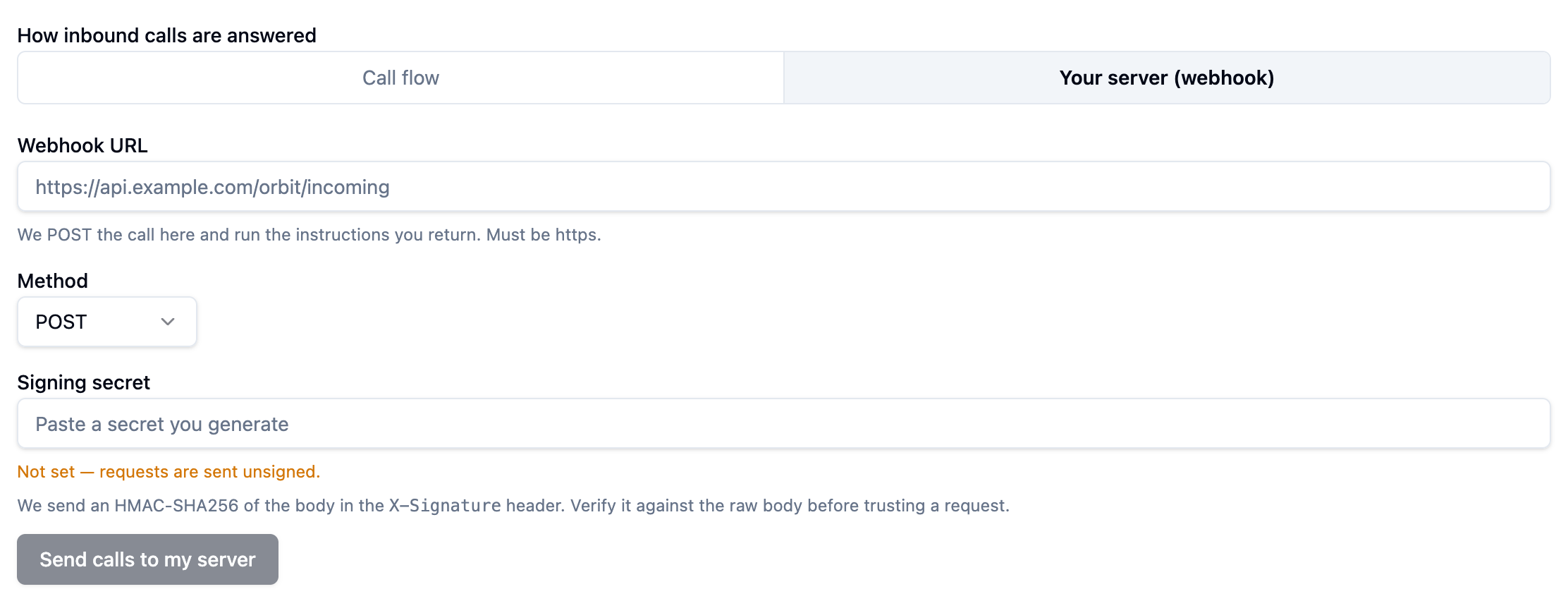
Under How inbound calls are answered, choose Your server (webhook).
-
Enter the Webhook URL —
https://, publicly reachable. Orbit refuses plain HTTP and addresses on private networks. -
Leave Method on POST — that is what carries the call payload.
-
Set a Signing secret — see §4.
-
Save.
The next call to that number goes to your endpoint.
Choosing a webhook replaces the call flow on that number; switching back
restores it. If the number shared its application with other numbers, Orbit
gives it one of its own (named Webhook — <number>) so the change cannot
leak onto its neighbours.
2. What Orbit sends you
As the call arrives — before the caller hears anything — Orbit posts:
POST https://api.example.com/orbit/incoming
Content-Type: application/json
User-Agent: SaaS-SBC/1.0
X-Signature: 9f2c8a1e…

{
  "callId":         "b1e7c0a4-…",
  "traceId":        "3a02f19d-…",
  "accountSid":     "d5aa32ea-…",
  "applicationSid": "5e7dff08-…",
  "from":           "15551001001",
  "to":             "902161234567",
  "direction":      "inbound",
  "callStatus":     "ringing"
}
| Field | Meaning |
|---|---|
callId | This call leg. It can change if the call is transferred. |
traceId | Stable for the whole conversation — the id you will find on the call record, the recording and the transcript. Store this one. |
accountSid | Your Orbit account. |
applicationSid | The application behind this number. |
from / to | Caller number and the dialled number, digits only. |
direction | inbound. |
callStatus | ringing — the call is not answered yet. |
Later requests — a gather's actionHook, or a redirect — are posted the same
way, and carry callId, accountSid, applicationSid, from, to and your
call tags, plus the digits or speech that were collected.
3. What you return
A JSON array of instructions, run in order. Each item is an object with a
verb field:
[
  { "verb": "say", "text": "Welcome to Acme Support." },
  {
    "verb": "gather",
    "input": ["dtmf"],
    "numDigits": 1,
    "say": { "text": "Press 1 for sales, 2 for support." }
  },
  { "verb": "queue", "name": "sales" }
]
One unknown verb invalidates the entire response — Orbit does not run the good instructions and skip the bad one. Validate what you emit.
Five verbs hand the call over and end the list: dial, queue,
conference, record and listen pass control on, so anything after them in
the array never runs. Put them last.
Available verbs
say — speak text
| Field | Type | Notes |
|---|---|---|
text | string | Required. |
language | string | e.g. en-US. Defaults to the application's language. |
voice | string | Defaults to the application's voice. |
loop | number | Repeat count. Default 1. |
play — play an audio file
| Field | Type | Notes |
|---|---|---|
url | string | Required. WAV or MP3, reachable over HTTPS. |
loop | number | Default 1. |
gather — collect keypresses or speech
| Field | Type | Notes |
|---|---|---|
input | string[] | ["dtmf"], ["speech"], or both. Default ["dtmf"]. |
numDigits | number | Expected digit count. Omit to collect until finishOnKey. |
timeout | number | Seconds to wait. Default 5. |
finishOnKey | string | Default #. |
say / play | object | Prompt to play while listening. |
actionHook | string | URL that receives { digits, speech } and returns the next instructions. |
dial — connect the caller to someone
| Field | Type | Notes |
|---|---|---|
target | object[] | Required, tried in order. Each { type, name }, where type is user, phone, sip or queue. |
timeout | number | Ring timeout in seconds. Default 60. |
callerId | string | Overrides the presented number. Must be a number your account owns. |
record | boolean | Record this leg. Default false. |
queue — place the caller in a queue
| Field | Type | Notes |
|---|---|---|
name | string | Required. Queue name as configured in Orbit. |
moh | string | Music-on-hold stream. Default default. |
timeout | number | Maximum wait in seconds. Default 300. |
timeoutHook | string | URL called if the wait runs out. |
announcePosition | boolean | Default true. |
announceInterval | number | Seconds between announcements. Default 30. |
conference — join a conference room
| Field | Type | Notes |
|---|---|---|
name | string | Required. |
muted | boolean | Join muted. Default false. |
startOnEnter | boolean | Default true. |
endOnExit | boolean | Default false. |
maxParticipants | number | Default unlimited. |
record | boolean | Default false. |
record — start recording
| Field | Type | Notes |
|---|---|---|
format | string | mp3 or wav. Default mp3. |
stereo | boolean | Separate channels per party. Default true. |
statusHook | string | URL notified when the recording is ready. |
listen — stream the audio to your service
| Field | Type | Notes |
|---|---|---|
url | string | Required. wss:// endpoint. |
mixType | string | mono, stereo or mixed. Default mixed. |
sampleRate | number | 8000 or 16000. Default 16000. |
metadata | object | Sent with the first WebSocket message. |
pause, hangup, redirect, tag
| Verb | Field | Notes |
|---|---|---|
pause | length | Seconds to wait. Default 1. |
hangup | reason | Optional, recorded on the call record. |
redirect | url | Fetch the next instructions from another URL (posted like the first request). |
tag | data | Key/value metadata attached to the call record. |
4. Verify the signature
With a signing secret set, every request carries an X-Signature header: the
HMAC-SHA256 of the request body, hex encoded, with no prefix.
const crypto = require("crypto");

const expected = crypto
  .createHmac("sha256", process.env.ORBIT_SIGNING_SECRET)
  .update(rawBody)                       // the raw bytes, BEFORE JSON.parse
  .digest("hex");

if (expected !== req.headers["x-signature"]) {
  return res.sendStatus(401);
}
A parsed and re-serialised JSON object has different bytes, and the signature
will never match. In Express, use express.raw({ type: "application/json" }),
or the verify callback on the JSON parser.
Orbit stores the secret encrypted and never returns it — the screen shows only its last four characters. Keep your own copy when you create it.
5. Timeouts and failures
| Situation | What happens |
|---|---|
| No reply within 10 seconds | The request is retried — 3 attempts in total, 0.5 s then 1 s apart. |
| Any non-2xx status | Counted as a failure and retried the same way. |
| An empty body | Read as "no instructions": the call is ended. |
| An empty array, or an unknown verb | The response is rejected. |
The caller is waiting in silence while your endpoint thinks, and a reply that never arrives leaves them with nothing to hear. So treat the webhook as a latency budget, not a place to work:
Return a short instruction immediately — a say and a queue — and do the slow
part afterwards. A CRM lookup inside the webhook reply makes every caller wait
for your slowest dependency, and a 500 from it costs you the call.
6. Test before you go live
- Point the number at a request-capture service and place a call, so you can see the exact payload your endpoint will receive.
- Reply with the smallest valid body and confirm you hear it:
[{ "verb": "say", "text": "Webhook is working." }, { "verb": "hangup" }]
- Turn on signature checking and confirm a request signed with the wrong secret is rejected by your own code.
- Switch back to a call flow at any time from the same screen.
7. The call record is unchanged
A webhook-answered call produces the same call record, recording, transcript and
analytics as any other call — see
Recordings, Transcripts & AI Analytics. Use traceId
from the payload to line your own records up with Orbit's, and the
Developer chapter's API to pull them.