Agents & Teams
4. Workforce reports — where paid time goes
Two reports under Analytics turn the live roster into history you can act on. Both are scoped by the same hierarchy as everything else — an agent sees only themselves, a supervisor their branch, an admin everyone — and both carry a Day / Week / Month / Custom picker that also compares against the previous period of the same length.
Shrinkage — the honest version


Measured against logged-in time, with unavailable time split into planned, unplanned, and system loss.
Shrinkage answers "where did the paid hours go?" — but only counts hours an agent was logged in. Someone signed out isn't being paid to be available, so they're not in the denominator. Two things follow that surprise people:
- Idle is not shrinkage. Waiting for a call is paid capacity doing its job.
- Unavailable time splits three ways:
- Planned — training, meetings: agreed time, not the part you manage down.
- Unplanned — breaks and the like: the part you can manage.
- System loss — a dropped connection: not the agent's fault, shown apart.
Which bucket a reason lands in comes straight from its Shrinkage type switch on the Agent States → Reasons tab (§3). The headline number is compared against your account's target (30% by default), and the report tells you plainly when too much unavailable time has no reason attached — because leaving that time out would produce tidy percentages that describe only a minority of the hours. Making a reason mandatory on Not Ready is what fixes it at the source.
A viewer who can only see themselves gets the same page under the name My State Breakdown — it's their own time, not the team's.
Handle Time — AHT and what's inside it
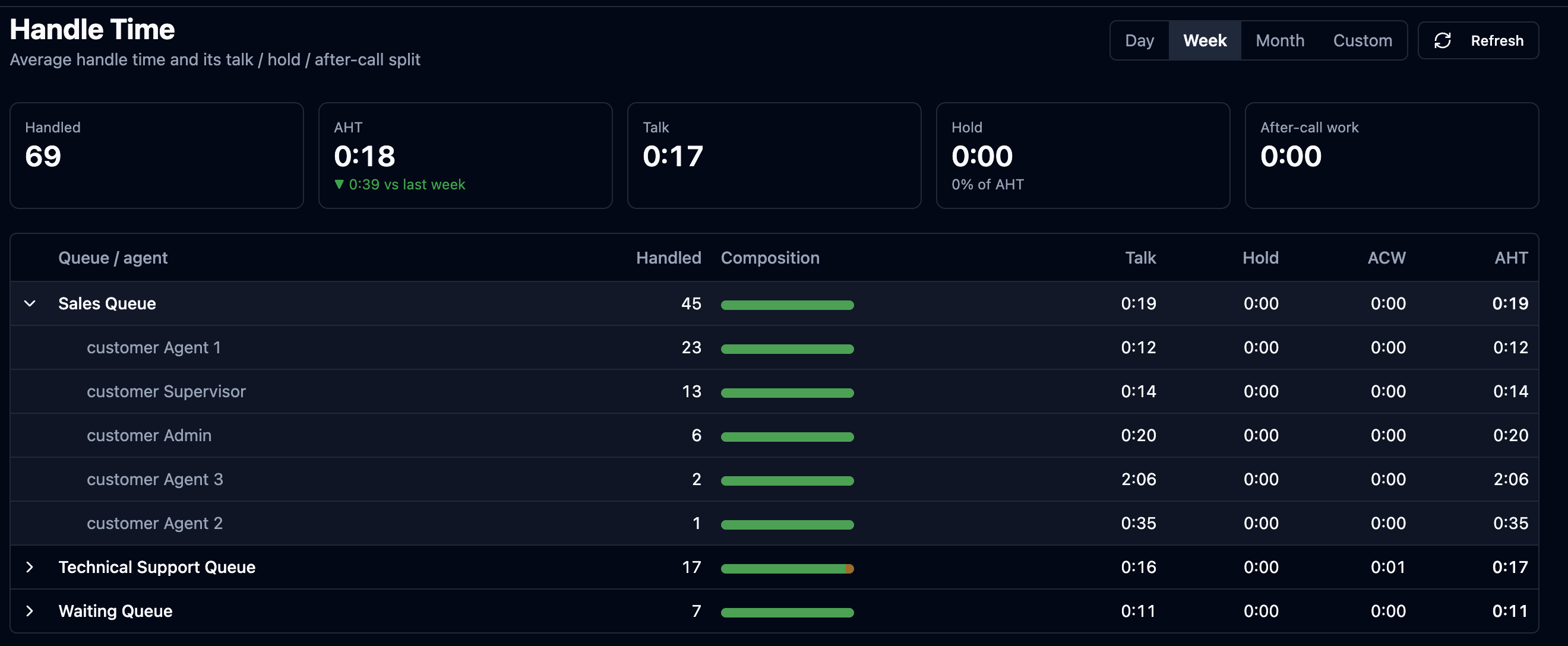
Average handle time per queue, expandable to each agent, every row carrying its talk / hold / after-call composition.
Average Handle Time (AHT) is one number hiding three. Two agents can both post a 4:00 AHT while one is almost all talk and the other almost all hold — the same figure, opposite problems: the first is about the conversation itself, the second is an agent who can't reach the information they need. So every row shows the split — talk, hold, and after-call work — as a composition bar, per queue and expandable to each agent. Numbers are averaged over segments of handled work, so a call that was transferred counts as the two real pieces of work it was.